.jpeg)
The Ultimate Guide to Email Warmup: How to Build Sender Reputation
Establishing a strong sender reputation is the foundation of successful email outreach, and the email warmup process dictates whether your messages reach the primary inbox or the spam folder.
This guide details the necessary actions to build trust with Internet Service Providers, covering the technical prerequisites like authenticating SPF, DKIM, and DMARC, the mechanics of generating positive engagement signals, and the precise ramp-up schedules—such as an initial volume of 10 emails per day—required for a sustainable sending program.
You will learn to differentiate between warming a domain versus a dedicated IP address and understand the critical metrics you must monitor to confirm success or know when to pause a campaign.
Mastering these phases ensures your infrastructure is aligned for long-term health, paving the way for consistently high deliverability across all major providers.
What is Email Warmup and Why is it Essential for Deliverability?
The Definition of Email Warmup
Email warm up is the technical process of establishing a positive sender reputation by gradually increasing email volume over several weeks. This controlled ramp-up period signals to providers that your account is legitimate.
Why You Must Warmup Your Email Account
Inbox Service Providers (ISPs) rely on trust mechanisms to filter incoming mail. A new domain that sends high volumes immediately is flagged as a "spam spike," leading to immediate blacklisting or poor email deliverability.
Warming up your account creates a predictable pattern of engagement. This alignment with the M3AAWG Best Practices for Senders builds the necessary history for your messages to reach the primary inbox.
Technical Prerequisites: SPF, DKIM, and DMARC
Before starting any email warm up, you must harden your infrastructure. These three protocols allow ISPs to verify that your domain is not being spoofed by bad actors.
- SPF (Sender Policy Framework): A DNS record that lists which servers are authorized to send mail for your domain.
- DKIM (DomainKeys Identified Mail): A digital signature that ensures your emails are not altered during transit.
- DMARC (Domain-based Message Authentication): A policy used to handle emails that fail SPF or DKIM checks.
Properly configuring these authentication pillars ensures that your warmup efforts aren't wasted on a technically flawed domain setup.
How the Email Warmup and Inbox Ramp Up Process Works
At its core, email warmup is a behavioral strategy designed to prove to Internet Service Providers (ISPs) like Google and Microsoft that you are a legitimate, high-quality sender. Instead of focusing solely on technical configurations, the warmup process focuses on generating positive engagement signals that build your sender reputation from the ground up.
The Mechanics of Engagement Signals
ISPs use sophisticated machine learning algorithms to monitor how recipients interact with your messages. When a new IP or domain suddenly sends thousands of emails, it triggers a "red flag" because this behavior mimics a spam attack. To avoid this, you must simulate a natural, organic growth pattern using specific engagement triggers.
Key behavioral signals that influence your deliverability include:
- Open Rates: Frequent opens indicate that your audience finds your subject lines relevant and your brand recognizable.
- Replies: This is the most powerful signal. A "reply-to" conversation suggests a one-to-one relationship, which is the antithesis of mass spam.
- Moving from Spam to Inbox: When a user finds your email in the junk folder and manually moves it to the "Primary" tab, it sends a high-priority correction signal to the ISP's filtering algorithm.
- Marking as "Not Spam": Similar to moving folders, this explicitly tells the ISP that your content is desired.
- Deleting After Reading: Even the act of reading an email before deleting it is viewed more favorably than "deleted without opening."
By consistently generating these signals at a gradually increasing volume, you establish a trusted sending history.
Manual vs. Automated Warmup Techniques
Choosing between a manual or automated approach depends on your scale, resources, and the complexity of your email infrastructure. While both aim to achieve the same result, the execution differs significantly.
Manual Email Warmup
- How it works: You personally send emails to friends, colleagues, or "seed" accounts and ask them to open, reply, and move your messages out of the spam folder.
- Pros: High-quality, genuine interactions that are virtually indistinguishable from standard business communication.
- Cons: Extremely time-consuming, difficult to track progress, and nearly impossible to scale for businesses sending more than a few hundred emails a day.
Automated Email Warmup
- How it works: Software platforms (like Mission Inbox) use a network of real email accounts to automatically interact with your messages, ensuring they are opened, replied to, and rescued from spam folders.
- Pros: Highly scalable, provides data-driven insights, and maintains a consistent inbox ramp up schedule without manual intervention.
- Cons: Requires choosing a reputable provider to ensure the "warmup pool" consists of high-reputation accounts.
For high-volume senders utilizing a dedicated IP, an automated solution is typically the only viable way to manage the ramp-up phase without risking a permanent blacklisting. An automated system ensures that the volume increases are precise—usually starting with 10-20 emails per day and scaling incrementally over 4 to 8 weeks—to mimic a healthy, growing business.
Recommended Sending Volumes and Ramp-up Schedules
Successfully executing an email warm up strategy requires a disciplined approach to volume. You cannot jump from zero to thousands of emails overnight without triggering spam filters and damaging your sender reputation. Instead, you must prove to Internet Service Providers (ISPs) like Google and Outlook that you are a legitimate sender through a calculated increase in traffic.
The Warmup Timeline: How Long Does it Take?
A standard email warm up period typically lasts between 4 to 8 weeks. While it is tempting to accelerate this process, rushing the timeline is the most common reason for deliverability failure.
- Weeks 1–2: Focus on establishing a baseline and building "trust" signals through high engagement rates.
- Weeks 3–4: Begin scaling into moderate volumes while monitoring bounce rates and spam reports closely.
- Weeks 5–8: Transition to full production capacity and stabilize your SMTP mailbox reputation.
The exact duration depends on your target daily volume. If you plan to send 50,000 emails per day, your warmup will naturally take longer than if your goal is 1,000 per day.
Daily Sending Volume Recoimmendations
The key to a successful ramp-up is consistency. ISPs look for patterns; a sudden spike followed by three days of silence is a major red flag. You should send emails every day—including weekends—to maintain a steady reputation growth.
For those using dedicated infrastructure, it is critical to start with a very low volume to ensure your IP address isn't flagged as a "cold" source for bulk mail.
.webp)
30-Day Volume Ramp-Up Chart
The following table outlines a recommended 30-day ramp-up schedule designed to take a new sender from 10 emails per day to 1,000 emails per day.
Once you reach the 1,000/day milestone, you should maintain this volume for at least five days before attempting to scale into higher tiers. If at any point your open rates drop significantly or your bounce rate exceeds 1%, pause the volume increases and hold at your current level until metrics stabilize.
This structured approach ensures that your email warm up efforts translate into long-term inbox placement rather than a temporary spike followed by a permanent block. To understand the mechanics behind these numbers, it is helpful to look at how the email warmup and inbox ramp up process works under the hood.
Differences Between Domain and Dedicated IP Warmup
Comparing Domain Warmup and Dedicated IP Warmup
To master the email warm up process, you must understand that mailbox providers (like Google and Microsoft) evaluate your reputation using two distinct identifiers: your domain and your sending IP address. While they work together to determine deliverability, their technical behaviors are fundamentally different.
Domain Reputation: The Portable Identity
Your domain reputation (e.g., yourcompany.com) acts as your digital "credit score." It is portable, meaning that if you change email service providers or move to a new server, your domain's sending history follows you. Mailbox providers track how recipients interact with your specific domain across the entire internet. This makes domain health the most critical long-term asset in your email infrastructure, as a "burned" domain is difficult to rehabilitate regardless of the server used.
IP Reputation: The Location-Specific Pipe
An IP reputation is location-specific. It is tied directly to the specific numerical address of the server used to route your mail. Unlike a domain, an IP reputation is non-portable; if you migrate to a new dedicated IP email service, you begin with a "cold" IP that has no established history with ISPs.
Warming Up Domain and IP Simultaneously
For high-volume senders, warming a domain in isolation is rarely sufficient. If you are sending significant volumes of marketing or transactional mail, you need the control provided by dedicated infrastructure. However, a new dedicated IP is often viewed with suspicion by receiving servers because it lacks a "sending heartbeat."
When you perform a simultaneous warm-up, you are building two layers of trust at once. The mailbox provider sees a reputable domain (your identity) paired with a steadily increasing, predictable volume from a specific IP (your infrastructure). This dual-layer approach significantly reduces the risk of rate-limiting or temporary blocks that occur when a sender's infrastructure doesn't match their domain's perceived authority.
> Pro Tip: The Gold Standard for High-Volume Senders
> Warming both your domain and dedicated IP simultaneously is the industry gold standard for deliverability. This "synchronized ramp-up" ensures that as your domain authority grows, your IP's throughput capacity scales alongside it. This prevents the reputation mismatch that often triggers spam filters when a trusted domain suddenly begins sending high volumes through an unverified, cold IP address.
.webp)
Monitoring Success and Handling Deliverability Issues
Monitoring your email warm up progress is not a "set it and forget it" task. To protect your domain and IP reputation, you must actively track how mailbox providers (MBPs) like Google and Outlook are reacting to your increased volume.
Measuring Warmup and Reputation Success
Success in an email warmup strategy is measured by consistent inbox placement and high engagement rates. While most sending platforms provide basic stats, the most accurate data comes directly from the source.
For senders targeting Gmail users, Google Postmaster Tools is an essential resource. It provides direct insight into your domain reputation, IP reputation, and delivery errors. Seeing a "High" or "Medium" reputation status in Postmaster Tools confirms that your warmup is working. Conversely, if you see your reputation trending toward "Low" or "Bad," you must immediately throttle your volume.
Beyond external tools, you should integrate domain reputation monitoring into your daily workflow to catch dips in performance before they result in permanent blacklisting.
Checklist: Red Flag Metrics to Watch
If you encounter any of the following "Red Flags," you must STOP increasing volume immediately and pivot back to a lower daily limit until the issue is resolved.
- Bounce Rate > 2%: A high bounce rate signals to ISPs that you are sending to unverified or stale lists, which is a primary indicator of spam.
- Open Rate < 15%: If fewer than 15% of your recipients are opening your emails, it suggests your messages are landing in the spam folder or your audience is unengaged.
- Spam Complaints: Even a small uptick in manual "Report Spam" clicks can halt a warmup process. Aim for a complaint rate below 0.1%.
- Sudden Throttling: If you notice a "421" or "temporary failure" error in your logs, the MBP is telling you that you are sending too much, too fast.
- Blacklist Inclusion: Regularly check if your IP or domain has appeared on major blacklists like Spamhaus or Barracuda.
.webp)
The Risks of Premature Stopping
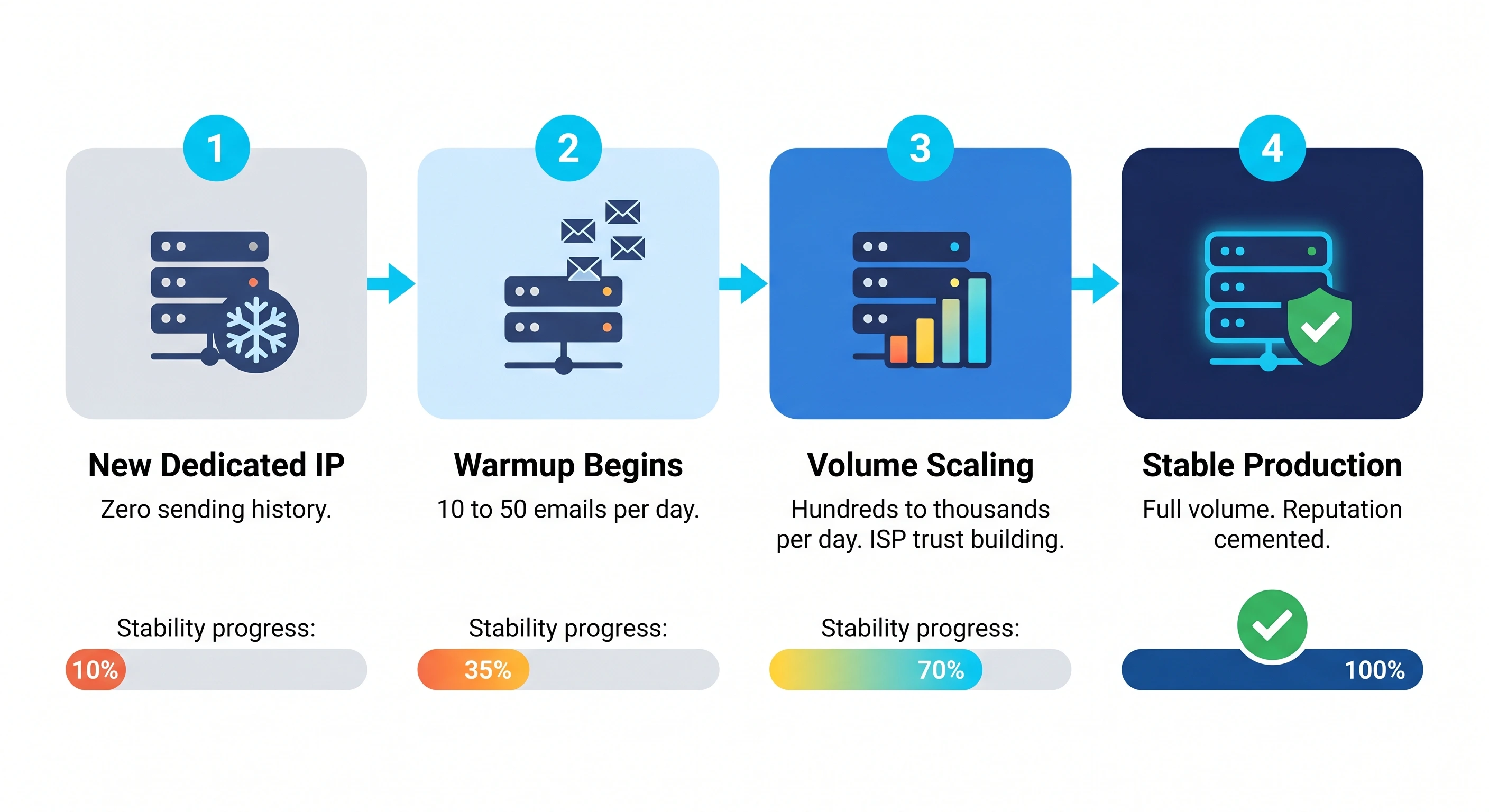
One of the most common mistakes in an email warm up strategy is stopping the process too early. Just because you have reached your target daily volume does not mean your reputation is "cemented."
Reputation is dynamic. If you suddenly stop sending or significantly change your sending patterns after the warmup period, MBPs may view the lack of activity as a sign of a compromised account or a "burnt" domain.
Maintaining a consistent baseline of premium warm-up activity ensures that your infrastructure stays "fresh" in the eyes of spam filters. This ongoing protection allows you to handle fluctuations in marketing or sales volume without triggering aggressive filtering.
Essential Email Best Practices for Long-Term Sending Health
Successfully completing an email warm up is only the first step. Maintaining a high sender reputation requires consistent adherence to "hygiene" rules that signal to ISPs (Internet Service Providers) that your content is valuable, not intrusive. If you ignore these best practices after the initial ramp-up, your domain reputation will quickly degrade, landing your messages back in the spam folder.
Universal Sending Rules: The 7 C's
To ensure your emails are both deliverable and engaging, every campaign should be audited against the 7 C’s of email marketing. These principles focus on clarity and professionalism, which directly reduce the likelihood of recipients marking your emails as spam.
- Clear: Use a straightforward subject line and a recognizable "From" name. Ambiguity is a major trigger for spam complaints.
- Concise: Keep your message brief. Long-winded emails are often ignored or flagged as low-quality by automated filters.
- Concrete: Provide specific details and a singular, obvious goal. Avoid vague offers that sound like phishing attempts.
- Correct: Ensure your grammar is perfect and all links work. Technical errors and typos are hallmark signs of poorly constructed spam.
- Coherent: Every sentence should support the main objective. A disjointed email feels like a "spray and pray" blast rather than a targeted communication.
- Complete: Include all necessary information, such as your physical business address and a clear unsubscribe link, to remain compliant with CAN-SPAM and GDPR regulations.
- Courteous: Maintain a professional tone. Aggressive or "salesy" language (e.g., using all caps or excessive exclamation points) triggers both human annoyance and algorithmic spam filters.

The 3-Email Rule and 60/40 Content Ratio
Beyond the writing style, the technical structure and timing of your emails are critical for long-term deliverability.
The 3-Email Rule (Cadence)
To protect your sender reputation, follow the 3-email rule for cadence. This rule dictates that you should never send more than three emails to a single recipient within a 7-day period.
Even if you have a complex sequence, over-saturating an inbox leads to "fatigue," which is the leading cause of manual spam reports. Spacing your follow-ups ensures that your domain isn't perceived as aggressive by the recipient’s mail server.
The 60/40 Rule (Content Ratio)
ISPs look at the balance between text and visual elements to determine if an email is legitimate. The 60/40 rule requires your email to consist of at least 60% text and no more than 40% images.
- Why it matters: Spammers often hide "trigger words" inside images to bypass text-based filters. Consequently, ISPs are naturally suspicious of image-heavy emails.
- Best Practice: Always include at least 400 characters of high-quality text. Avoid sending "single-image" emails where the entire message is contained within a graphic.
By combining a disciplined email warm up strategy with these permanent sending rules, you create a sustainable environment for high-volume outbound growth.
The Role of Robust Infrastructure in Sustaining Sender Reputation
Successful email warm up is not a one-time event; it is the initialization of a long-term relationship between your infrastructure and the world's most sophisticated spam filters. While the initial warmup period gets your "foot in the door," the underlying architecture of your email system determines if that door remains open.
Transitioning from a warmup mindset to a long-term infrastructure mindset requires shifting focus from sending volume to sending stability. A robust infrastructure ensures that the hard-won reputation earned during the warmup phase isn't instantly eroded by a single marketing spike or a configuration error.
Aligning Warmup with Email Architecture
Your warmup strategy must be a direct reflection of your intended scale. If you plan to send high volumes from dedicated IPs, your warmup process should be designed specifically for that hardware. Attempting to warmup a shared IP pool and then suddenly switching to a dedicated environment is a common mistake that can trigger immediate "reputation shocks."
A strategic cold email deliverability strategy relies on matching your sending patterns to your technical setup. This means:
- Scaling in proportion to your hardware’s capacity.
- Validating DNS records (SPF, DKIM, DMARC) throughout the process.
- Ensuring consistency in sending frequency to avoid the erratic behavior that alerts spam filters.

Resource Isolation and AI Monitoring
One of the most effective ways to sustain reputation is through resource isolation. This involves physically and logically separating different types of email traffic. By using separate subdomains or dedicated IPs for transactional mail (receipts, password resets) and marketing mail (newsletters, cold outreach), you prevent "reputation bleeding."
If a marketing campaign inadvertently triggers high bounce rates, resource isolation ensures your critical transactional emails are not caught in the crossfire. Without this separation, a single bad list can bring down your entire communication ecosystem.
To maintain health in a modern email landscape, manual checks are no longer sufficient. AI monitoring provides a proactive layer of defense. Advanced platforms now use machine learning to:
- Detect reputation dips before they result in blacklisting.
- Automatically throttle volume if engagement metrics (like open rates) drop below a certain threshold.
- Balance sending loads across multiple providers to optimize deliverability.
Integrating AI-powered warm-up and monitoring into your infrastructure allows you to maintain a "healthy state" indefinitely, rather than just surviving the first 30 days of sending.
Ready to build an email foundation that never misses the inbox?
[Experience the power of AI-driven infrastructure with Mission Inbox today.](https://missioninbox.com/)
Frequently Asked Questions About Email Warmup
Is email warmup the same as IP warming?
They are related but distinct concepts. Domain warmup focuses on the reputation of your specific web address (e.g., @yourcompany.com), while IP warming builds trust for the specific server address used to dispatch mail. High volume senders using dedicated infrastructure must manage both to ensure ISPs recognize both the sender identity and the delivery source as legitimate.
Can I skip the warmup process if I only send 50 emails a day?
Skipping this phase is risky regardless of volume. Even a modest 50 emails a day can trigger spam filters if those messages originate from a brand new account with no history. ISPs look for patterns of human like behavior, such as gradual volume increases and consistent engagement, to distinguish real users from automated spam bots.
What is the impact of a 'cold' start on a new marketing domain?
Starting cold often leads to immediate deliverability issues like graylisting or blacklisting. Because ISPs have no historical data on your new domain, they default to a high sensitivity setting. A sudden burst of marketing activity without a prior ramp up period suggests a compromised account or a spammer, often resulting in your emails being diverted to the junk folder or blocked entirely.
Does the recipient's email provider (Gmail vs. Outlook) change how I should warm up?
Every mailbox provider uses unique filtering logic. Gmail places immense value on user engagement signals like replies and marking emails as important. In contrast, Outlook and corporate filters often lean more heavily on technical authentication and historical IP reputation. A successful warmup strategy must account for these differences by sending to a diverse mix of providers to build a well rounded reputation.
How do I know if my email reputation is 'excellent' enough to stop the warmup?
Reputation is never truly finished but rather enters a maintenance phase. You can consider your warmup successful when you consistently reach your target daily volume with high open rates, negligible bounce rates, and zero spam complaints. Monitoring tools like Google Postmaster will show your domain reputation climbing toward a green or high status, indicating your infrastructure is ready for full scale operations. Maintaining this momentum requires a foundation built on reliable technology and strategic oversight.
Secure Your Sending Future
Establishing a bulletproof sender reputation from day one involves more than just following a schedule; it requires the right technical backbone. Our dedicated IP email service provides the high volume email infrastructure needed to isolate your reputation and ensure your messages reach the inbox consistently.
Share article
.svg)
.svg)

Read Time
12 MIN READ

Send with Protection
Stop relying on shared infrastructure that you don't control. Mission Inbox gives you dedicated servers, dedicated IPs, and full ownership of your sending reputation.