
.jpg)

12 Best Email Warm Up Tools for High-Volume Outreach (2026)
Successfully executing high-volume cold outreach hinges entirely on establishing and maintaining strong domain reputation, which is precisely what email warmup tools accomplish.
These platforms automate the necessary, time-consuming process of simulating authentic human engagement to trick Internet Service Providers (ISPs) into trusting your sending volume. You need to understand the essential outcomes, such as achieving consistent inbox placement, the specific actions tools take to build this trust, and the underlying mechanics governing domain and IP scoring. Furthermore, we must examine the crucial tradeoffs between network size and AI sophistication, assess the necessary ramp-up timelines, and weigh the investment costs against the tangible reduction in spam folder placements.
Grasping these foundational elements allows you to move confidently toward managing your active sending schedule while your inboxes mature toward enterprise-level stability.
The Leading Email Warm Up Tools for 2026: A Shortlist
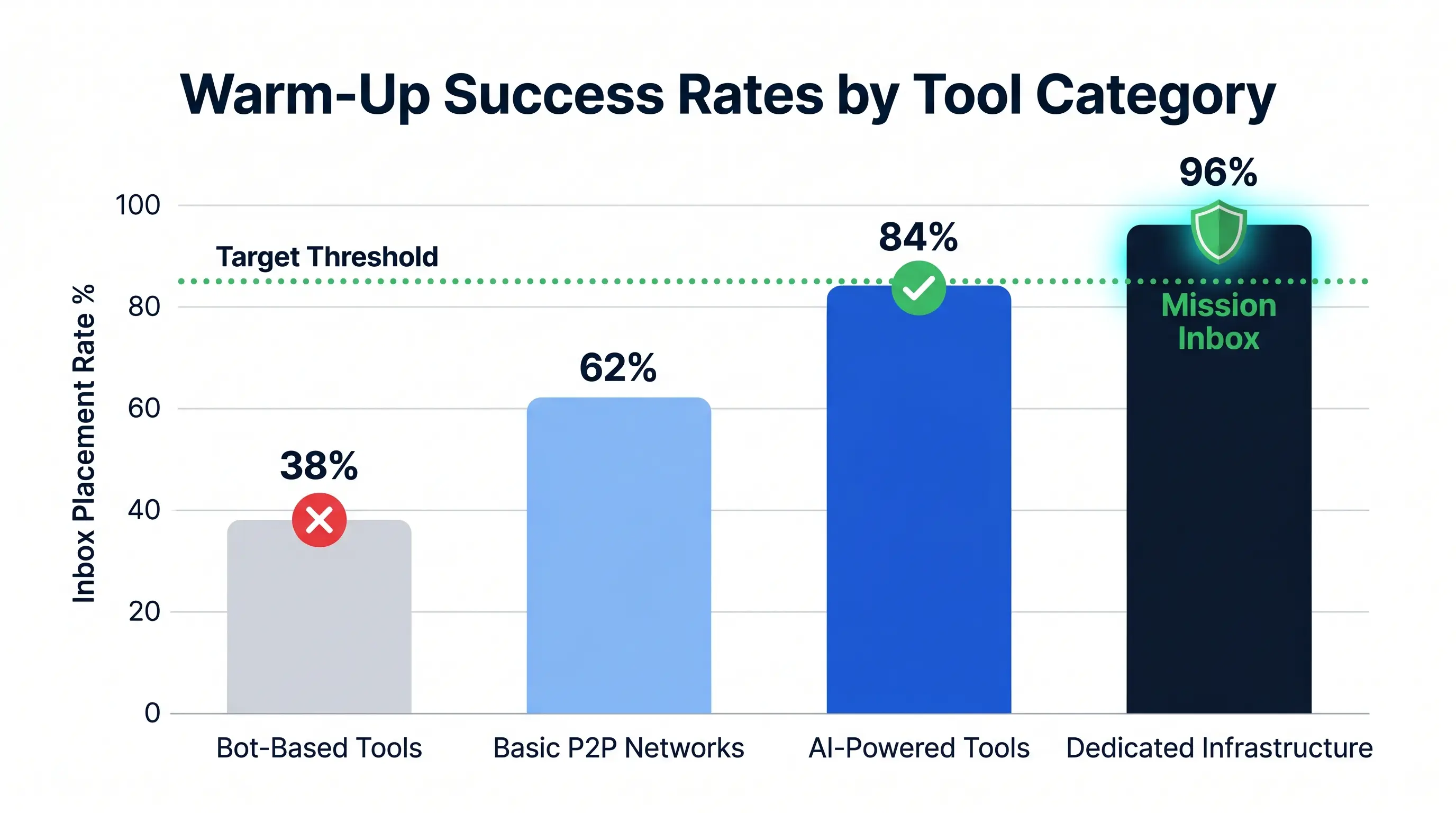
Effective email warm up tools have evolved beyond simple volume ramping. In 2026, the focus has shifted entirely toward AI-powered engagement and maintaining a high email sending score.
Modern algorithms from Google and Outlook now prioritize human-like interactions. To stay out of the spam folder, your warm-up strategy must simulate authentic conversations that signal high-quality content to ISPs.
Key 2026 Email Warm-Up Trends:
- Generative AI Replies: Moving away from gibberish text to contextually relevant conversations that satisfy spam filters.
- Reputation Shielding: Real-time monitoring that automatically pauses sending if your deliverability metrics dip below a safe threshold.
- Multi-ESP Networking: Sophisticated tools now balance interactions across Gmail, Outlook, and private servers to diversify reputation signals.
- Smart Throttling: Algorithms that adjust sending speed based on the age and history of your specific domain rather than static schedules.
- Engagement-First Metrics: Shifting the focus from "open rates" to reply rates and "marked as important" signals within the inbox.
1. Mailreach - Best for AI-Powered Deliverability Protection
Mailreach is a specialized email warm up tool designed to build sender reputation through a sophisticated peer-to-peer (P2P) network. Rather than relying on "bot" accounts, Mailreach connects your inbox to over 30,000 real, high-reputation addresses across Gmail, Outlook, and other major providers. This network creates a web of authentic interactions that signal to spam filters that your domain is a trustworthy sender.
.webp)
The platform offers several technical features that ensure your emails land in the primary inbox:
- Spam Checker: This diagnostic tool provides a real-time deliverability score. It analyzes your technical setup and content to identify issues before you launch a campaign.
- Auto-Move from Spam: If a warm-up email lands in the junk folder, Mailreach automatically moves it to the primary inbox. It marks the message as "not spam," which directly improves your email sending score.
- Blacklist Monitoring: The system constantly checks if your domain or IP has been flagged by major providers.
Mailreach’s effectiveness stems from its AI simulation of natural human engagement. The AI does more than just send emails; it generates meaningful, human-like conversations with varied subject lines and body text. It mimics real user behavior by opening messages, marking them as important, and engaging in multi-message threads. This level of realistic activity ensures that your warm-up process looks organic and protects your long-term deliverability.
Lemwarm - Best for Large Peer-to-Peer Communities
lemwarm stands out as a market leader due to its massive peer-to-peer network of over 10,000 real users. Unlike tools that rely on "fake" bot accounts, lemwarm facilitates interactions between actual human-owned inboxes. This creates a highly realistic sender reputation that major providers like Google and Outlook trust.
The scale of this community ensures your domain interacts with a diverse range of Email Service Providers (ESPs). This diversity is crucial for building a resilient sender reputation, as it mimics the natural variability of high-quality business communication. By engaging with real accounts, you significantly reduce the risk of being flagged by spam filters.
Strategic Target Audience Warming
A standout feature of lemwarm is its Target Audience Warming capability. This setting allows you to tailor your warm-up strategy based on your specific industry, location, and recipient profile. Instead of random interactions, your account communicates with a "smart cluster" of users who match your ideal customer persona.
This targeted approach signals to ESPs that your content is relevant to the specific niche you intend to pitch. By warming up within your industry cluster, you prime your email infrastructure for the exact type of high-volume sending you will perform during live campaigns. It is one of the most sophisticated email warm up tools for niche-specific outreach.
Seamless Lempire Ecosystem Integration
As a core pillar of the Lempire ecosystem, lemwarm provides native integration with lemlist, a top-tier cold outreach platform. This synergy allows you to manage your entire sales cycle—from initial warm-up to automated multi-channel sequences—within a single, unified environment.
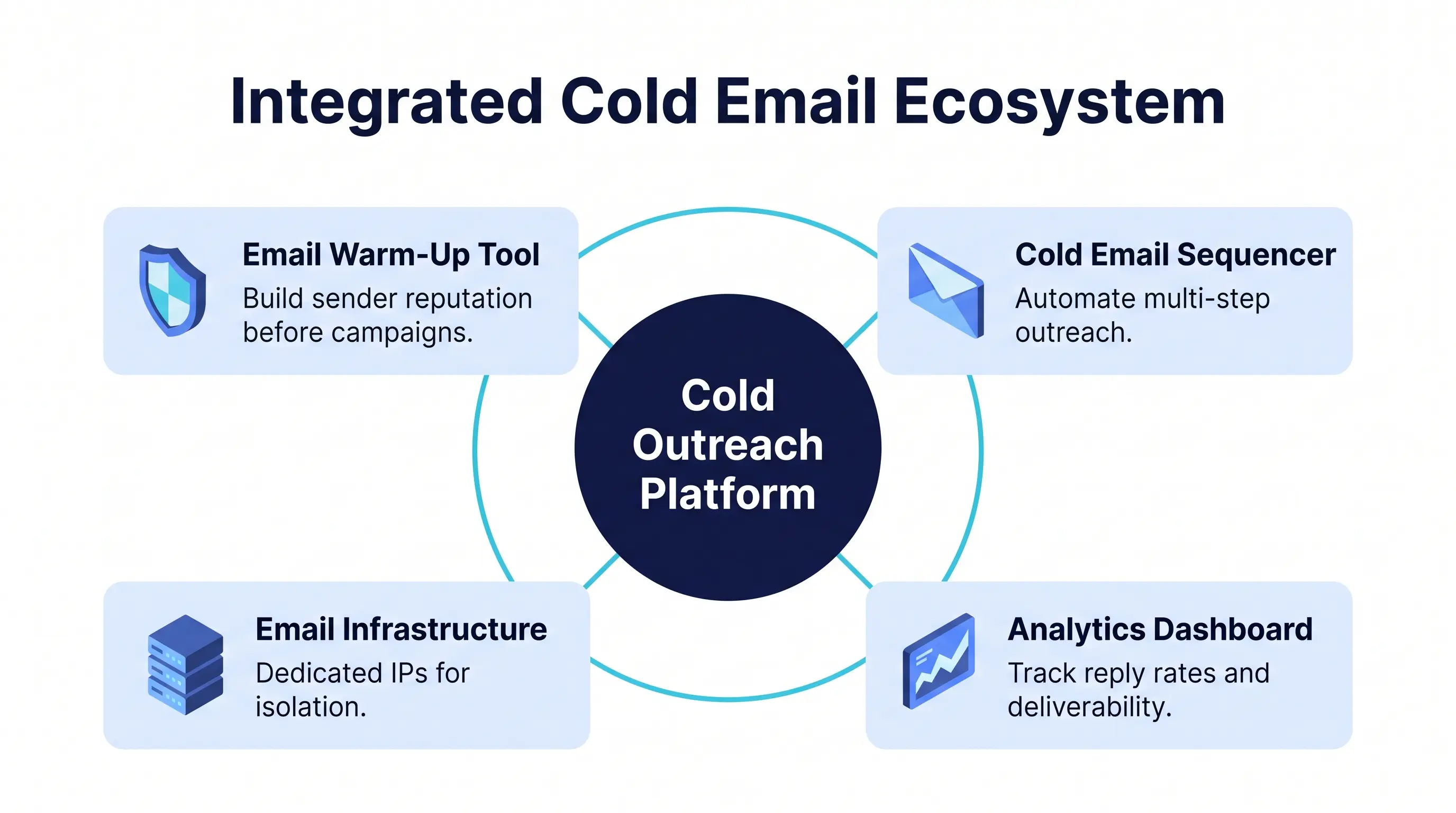
Integration within this ecosystem means your deliverability data flows directly into your outreach campaigns. You can pause or adjust sending volume automatically if lemwarm detects a dip in reputation. This proactive protection ensures that your deliverability remains high while you scale your business through the Lempire suite.
3. Warmy.io - Best for High-Volume Automation and Languages
Warmy.io stands out in the email warm up tools market by offering a heavy-duty solution for enterprises and agencies managing massive outreach operations. Unlike basic warm-up services, Warmy combines high-speed automation with deep technical audits to ensure your infrastructure remains healthy while scaling.
Advanced Deliverability with Health Checker
The cornerstone of Warmy’s platform is its Health Checker, a comprehensive diagnostic suite that performs real-time audits on your domain’s technical setup. Maintaining a high sender score is impossible without correct authentication; the Health Checker continuously monitors:
- SPF, DKIM, and DMARC Settings: Ensures your authentication records are valid and hasn't been accidentally altered.
- Blacklist Monitoring: Scans major global databases to alert you immediately if your IP or domain is flagged.
- Domain Age and Reputation: Provides a consolidated Health Score that reflects your overall standing with major ISPs.
.webp)
Native Multi-Language Mailbox Support
For international teams, Warmy is one of the few tools that mimics authentic human behavior across regional borders. By supporting 30+ languages, the platform ensures that the "seed" interactions your mailboxes receive are linguistically consistent with your target market. Supported languages include:
- English, Spanish, and French
- German, Portuguese, and Italian
- Dutch, Russian, Chinese, and Arabic
- Hindi, Japanese, and more
This multi-language capability prevents "out-of-pattern" flags from ISP filters that might find it suspicious if a domain sending exclusively in German is suddenly warmed up using only English content.
Scalable Infrastructure Management
Managing a large-scale infrastructure requires more than just sending emails; it requires a command center. Warmy’s dashboard is built for high-volume automation, allowing users to manage 400+ mailboxes from a single interface. Its Adeline AI engine handles semantic heating, which means the automated replies are relevant to your industry and niche, significantly reducing the risk of being flagged by AI-powered spam filters. The dashboard provides granular control over sending limits, ramp-up schedules, and API integrations, making it the preferred choice for those who need to maintain peak deliverability for hundreds of accounts simultaneously.
Woodpecker - Best Integrated Warmup for Sales Teams
Woodpecker differentiates itself from standalone email warm up tools by embedding its deliverability engine directly into its cold email automation platform. This integration is designed specifically for sales teams who need a "set it and forget it" approach that balances outbound volume with sender reputation safety.
The Logic of Integrated Deliverability
Unlike third-party warm-up services that operate independently of your actual sales campaigns, Woodpecker’s Warm-up & Recovery feature acts as a synchronized regulator. It monitors the health of your inbox while simultaneously managing your outbound outreach, ensuring your activity never triggers the "unusual behavior" filters of major ESPs.
Preventing Over-Sending via Synchronized Sending
The primary cause of domain burning is a sudden spike in email volume. Woodpecker prevents this through a logic-based Synchronization system:
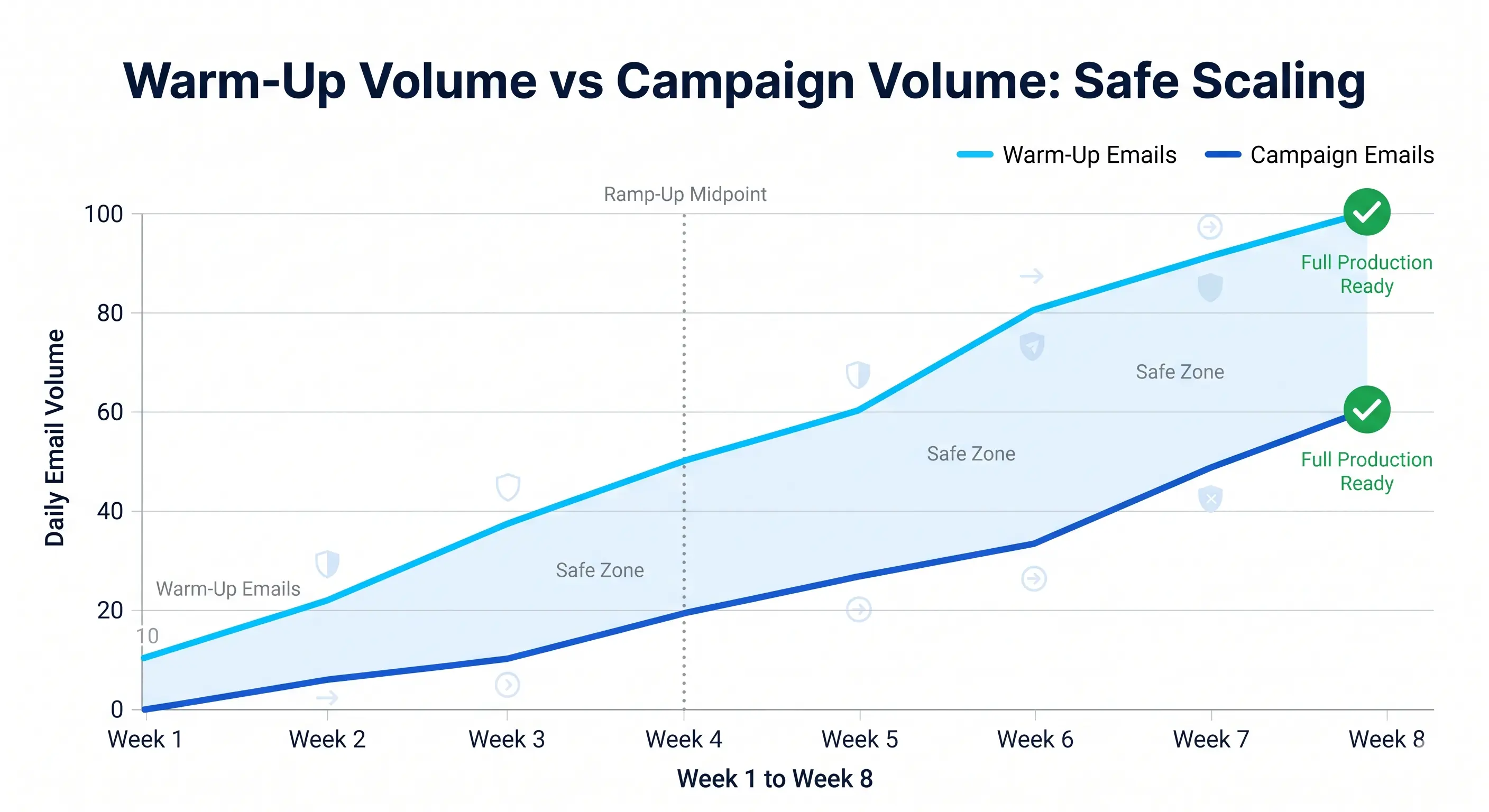
- Volume Balancing: Woodpecker automatically adjusts the ratio between warm-up emails and actual sales emails. As your warm-up volume increases and your reputation solidifies, the system safely scales your campaign outreach.
- Auto-Throttling: If the tool detects a dip in engagement or a rise in bounce rates, it automatically throttles your campaign volume. This prevents over-sending during periods where your domain reputation might be vulnerable.
- Natural Patterns: The tool mimics human behavior by varying sending times and intervals, ensuring your outreach doesn't look like a robotic burst of activity.
Domain Rehabilitation with Recovery Mode
For sales teams whose domains have already been flagged or landed in spam folders, Woodpecker offers a specialized Recovery Mode. This is a strategic pivot from standard warming to reputation repair.
- Detection: When a domain’s deliverability drops below a certain threshold, the system triggers a "Recovery" state.
- Campaign Pause: It can automatically pause active sales sequences to stop the bleeding while the reputation is being rebuilt.
- Intensity Shift: In Recovery Mode, the system prioritizes sending emails to high-reputation "seed" accounts that are guaranteed to open, click, and mark the emails as "not spam."
- Gradual Re-entry: Only once the domain's sender reputation has stabilized does the system allow for the gradual resumption of cold outreach.
Key Features for Sales Teams
- Built-in SPF/DKIM Check: Woodpecker verifies your email infrastructure before starting any warm-up or campaign.
- Multi-Inbox Management: Easily warm up dozens of accounts simultaneously, which is essential for scaling sales teams.
- Detailed Health Reports: Provides a clear "Health Score" for each connected domain so you know exactly which accounts are ready for high-volume outreach.
By combining prevention, synchronization, and recovery into a single interface, Woodpecker ensures that sales teams spend less time worrying about email deliverability and more time closing deals.
Our Methodology for Evaluating Warmup Platforms
To provide an objective ranking of the best email warm up tools, we evaluated each platform based on technical infrastructure and its ability to withstand the increasingly rigorous filtering used by major mailbox providers. Our assessment focuses on how these tools protect your sender reputation while scaling volume.
Network Authenticity
The most critical factor in choosing a warmup service is the quality of its peer network. We prioritize platforms that utilize real mailboxes owned by actual users or high-reputation aged accounts. Modern ESPs like Gmail and Outlook have become highly proficient at identifying bot-based warmup activities by tracking unnatural engagement signatures across thousands of accounts.
According to research from GlockApps, advanced mailbox providers can easily detect bot-like patterns and interactions that originate from simulated environments. Consequently, we only recommend tools that maintain a diverse network of authentic, non-bot participants to ensure the engagement signals sent to ESPs are viewed as legitimate human activity.
ESP Compatibility
A robust warmup strategy must cover the specific providers your business targets. We evaluated each tool on its native integration with major providers including Google Workspace, Microsoft 365, and iCloud, as well as its support for SMTP mailboxes.
While many tools historically relied on the Gmail API, Google’s 2023 policy changes restricted third-party warmup apps from using API access for this purpose. Our methodology favors tools that have successfully transitioned to IMAP/SMTP protocols, which allow for continued, compliant warmup across all major email ecosystems without risking account suspension.
AI Sophistication
To avoid detection by "spam traps" and behavioral filters, warmup interactions must be indistinguishable from human correspondence. We analyze the AI sophistication of each tool’s content generation and interaction scheduling.
Effective platforms use AI to generate unique, contextually relevant subject lines and body copy for every email, preventing the "footprinting" that occurs when thousands of identical emails are sent across a network. Furthermore, the AI must randomize sending intervals, reply rates, and "mark as important" actions to mirror natural human workflows, rather than firing off emails on a fixed, predictable schedule.
The Core Mechanics of Email Warming and Reputation Management
Understanding the technical bridge between a fresh email account and a high-performance outreach machine is critical for any sender. Without a strategic warmup phase, your infrastructure is essentially "guilty until proven innocent" in the eyes of major Mail Transfer Agents (MTAs).
What is email warmup and how does it work?
Email warmup is the process of gradually increasing the volume of emails sent from a new or inactive email account to build a positive sender reputation. At its core, this is a human behavior simulation.
Modern email warmup tools use a network of "peer" accounts to interact with your messages. Instead of just sending an email into the void, the tool automates a sequence of positive signals:
- Opening the email to improve open rates.
- Replying to the email to build thread history.
- Marking as "Not Spam" if the email lands in the junk folder.
- Moving to the Primary Inbox if it lands in the Promotions or Updates tabs.
By mimicking these high-engagement patterns, you prove to Internet Service Providers (ISPs) that your content is valuable and requested by recipients.
Why do I need to warm up my email?
ISPs like Google and Microsoft are highly sensitive to sudden spikes in volume. If a brand-new domain or IP address suddenly sends 500 emails in a single hour, it is immediately flagged as potential spam.
The goal of warming is to establish ISP trust. You are demonstrating that you are a legitimate sender who follows a predictable, non-aggressive pattern. This "probationary period" allows the ISP's filters to analyze your technical setup (SPF, DKIM, and DMARC) and your engagement metrics before granting you the ability to hit the primary inbox at scale.
Domain vs. IP Reputation
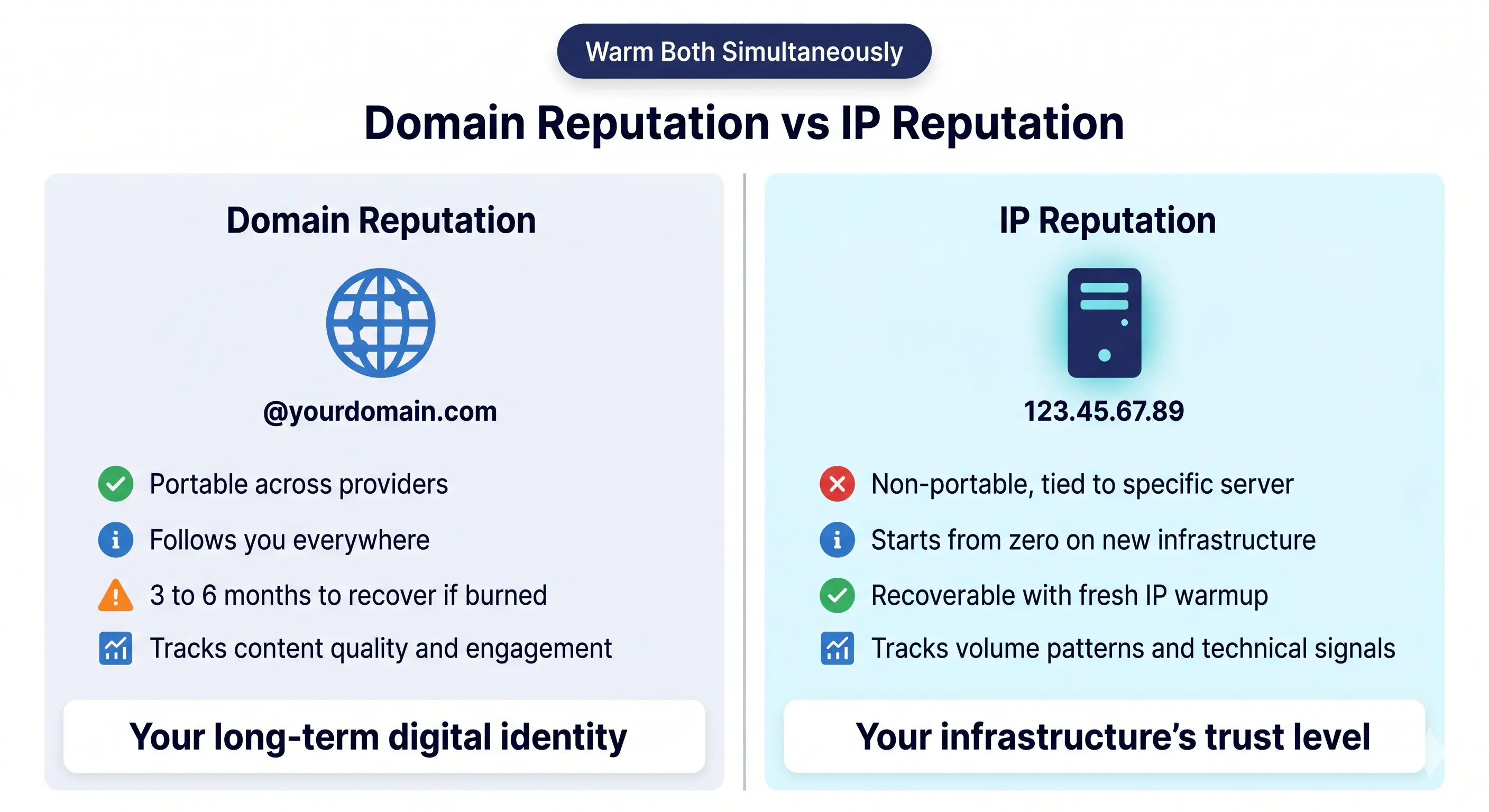
While often discussed together, Domain Reputation and IP Reputation are two distinct metrics that determine your deliverability.
- Domain Reputation: This is your "credit score" as a brand. It follows your domain (e.g., yourcompany.com) across different mail servers. If you switch from one email provider to another, your domain reputation travels with you.
- IP Reputation: This refers to the health of the specific "pipe" your emails travel through. For users on shared IP addresses, this can be volatile; for those using a dedicated infrastructure, you have total control.
To monitor these metrics accurately, every professional sender must utilize Google Postmaster Tools. This is the only way to get "under the hood" data directly from Gmail regarding your spam complaint rates and reputation status.
Key Rules for Sustainable Warming
To maintain a healthy reputation during and after the warmup phase, seasoned deliverability experts follow two essential guidelines:
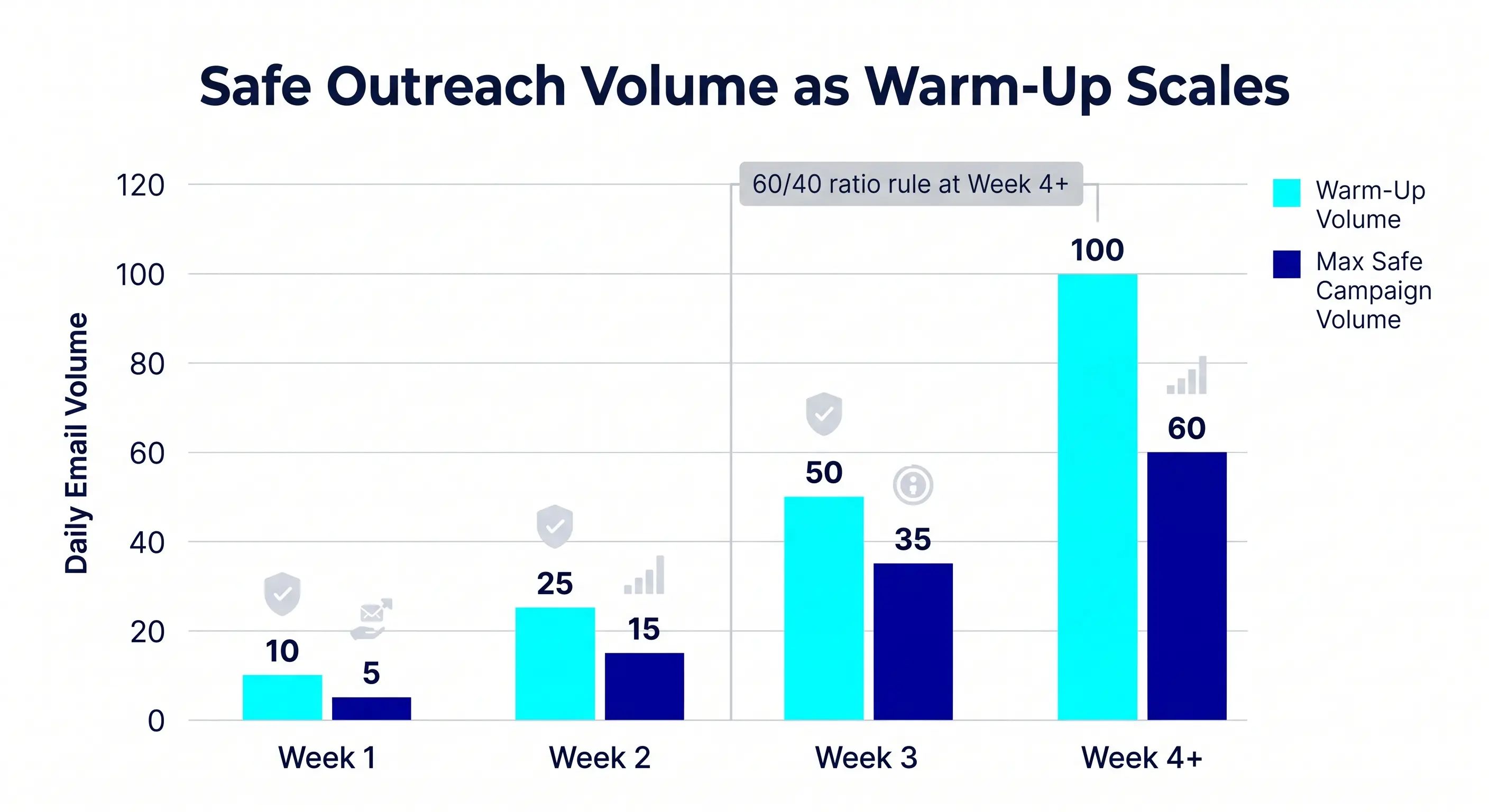
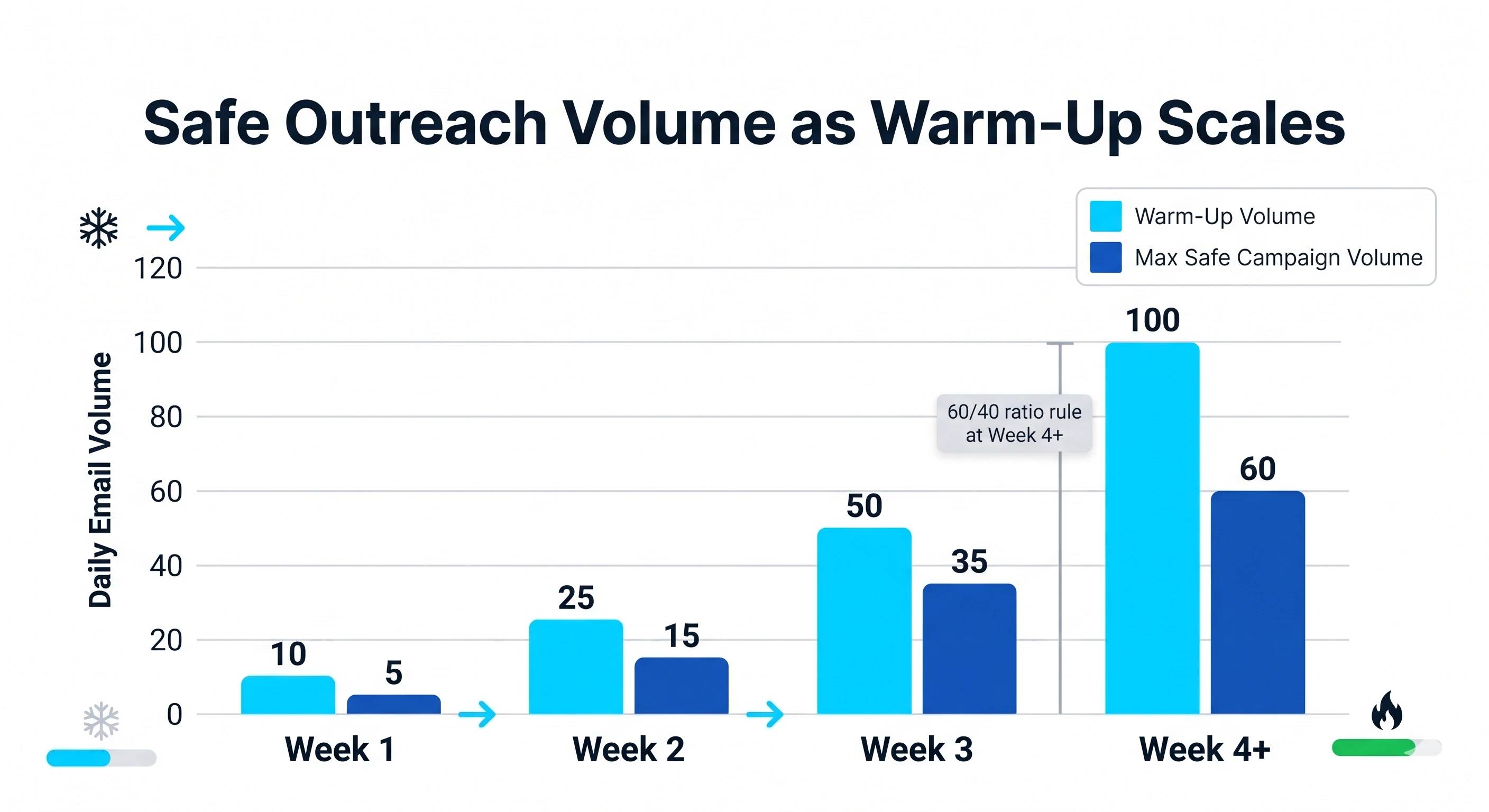
- The 5 Email Rule: When starting a brand-new account, never exceed 5 emails on the first day. From there, you should increase your volume by roughly 5–10 emails per day. Rushing this process is the fastest way to get a permanent shadowban.
- The 60/40 Rule: Once your account is fully "warmed" (usually after 3–4 weeks), you should never let your cold outreach account for 100% of your sending volume. Maintain a 60/40 ratio: 60% of your daily volume can be cold outreach, while 40% should remain "warmup/engagement" traffic. This 40% serves as a reputation buffer, ensuring that even if a few prospects mark you as spam, your overall engagement metrics remain high enough to keep you in the inbox.
Strategic Timelines for Ramping Up New Mailboxes
Successfully launching a new mailbox requires a disciplined approach to volume. If you treat a fresh domain like an aged one, ISPs (Internet Service Providers) will immediately flag your activity as suspicious. A strategic ramp-up period is essential to prove you are a legitimate sender rather than a spammer.
How long does it take to warm up an email?
For most users, a standard warm-up period lasts between 2 to 4 weeks. However, this timeline isn't fixed; it depends entirely on the engagement metrics your emails generate. If your emails receive high open and reply rates, you can scale faster. If you see high bounce rates or "marked as spam" reports, you must pause or slow down the process immediately.
Patience is the foundation of long-term cold email deliverability. Rushing the process might save you a few days now, but it will cost you months of repair work if your domain reputation is damaged.
Recommended daily sending volume increases
The key to a safe ramp-up is a gradual, linear increase in volume. You should never double your volume overnight. Instead, aim for steady daily increments that mimic natural human behavior.
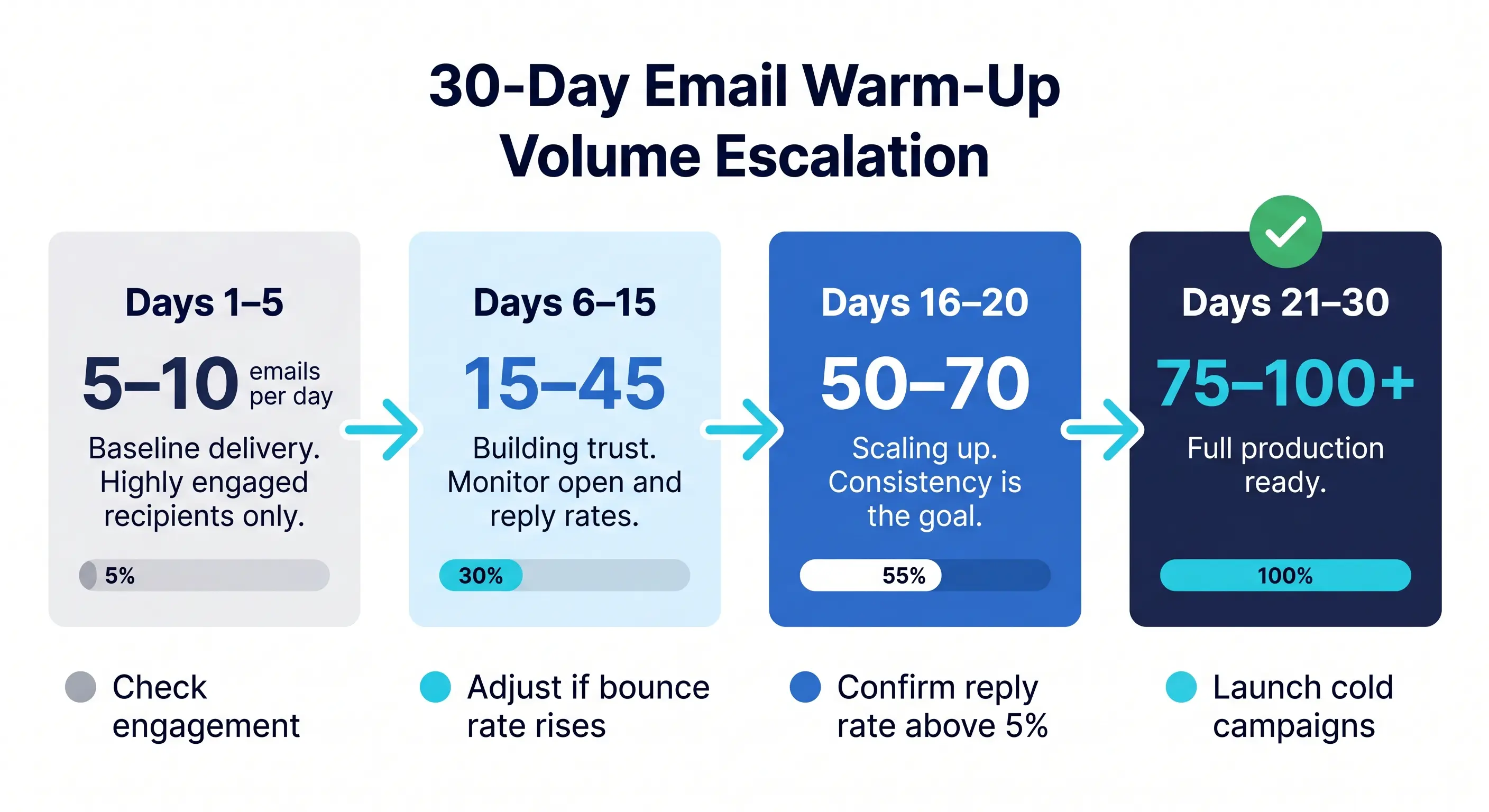
A typical 30-day schedule for a new mailbox looks like this:
What happens if inbox ramp-up exceeds the thresholds?
Exceeding these thresholds triggers automated "spam traps" set by providers like Google and Outlook. When a new IP or domain suddenly sends hundreds of emails, the ISP's first reaction is to protect its users by blocking the sender.
The primary risks of an aggressive ramp-up include:
- Permanent Blacklisting: Your domain or IP may be added to global blocklists. You should regularly use the Spamhaus Reputation Checker to ensure your infrastructure remains clean.
- Damaged Sender Score: Your email sending score will plummet, causing even your most personalized messages to land in the junk folder.
- Account Suspension: Workspace providers frequently suspend new accounts that exhibit "bot-like" sending patterns, which can result in a total loss of your outreach data.
To avoid these pitfalls, use professional email warm up tools that leverage AI-powered protection to simulate human engagement and manage these thresholds automatically.
Integrated Outreach: Managing Warmup and Active Campaigns Simultaneously
Managing a mailbox during the warm-up phase requires a delicate balance. While the primary goal of using email warm up tools is to build a positive sender reputation, most businesses cannot afford to wait weeks before launching their first outreach campaign. Fortunately, you can run both simultaneously if you follow a structured approach.
Can I send emails while my mailbox is ramping up?
Yes, you can send outbound emails while your mailbox is ramping up, but you must be conservative with your volume. If you suddenly send 100 cold emails on a brand-new domain, even with a warm-up tool running, ISPs (Internet Service Providers) will likely flag your account for suspicious activity.
The best practice is to treat your manual or automated outreach as part of your total daily limit. If your warm-up tool is sending 20 emails a day, keep your active outreach to a similar or lower number initially. As the tool increases the volume of "safe" interactions, you can incrementally scale your sales emails.
What is a good reply rate for sales emails?
In the context of deliverability, your reply rate is one of the most powerful signals to providers like Google and Outlook. A high reply rate proves that your emails are "wanted" by recipients, which helps you bypass the promotions tab and land directly in the primary inbox.
For cold sales outreach, a 1% to 5% reply rate is generally considered the industry standard. However, if you are targeting a highly specific niche with personalized content, you should aim for 10% or higher. If your reply rate drops below 1%, it may indicate a problem with your lead list quality or that your emails are being filtered into spam before they are even seen.
Metrics to monitor
To maintain high deliverability, you must look beyond just "sent" and "received" counts. Monitoring the right KPIs allows you to pause campaigns before your reputation is permanently damaged.
Key metrics to track include:
- Open Rate: Aim for 50% or higher. A low open rate usually indicates poor subject lines or that you are landing in the spam folder.
- Bounce Rate: Keep this below 2%. High bounce rates are a major red flag for ISPs.
- Spam Complaint Rate: This must stay below 0.1%. Even a few "Report Spam" clicks can tank your reputation.
To ensure your outreach is received well and encourages engagement, use the following checklist based on the 7 C's of email etiquette:
The 7 C’s of High-Deliverability Outreach Checklist
- Clear: Use a straightforward subject line and a clear call-to-action (CTA). Confusion leads to the "Delete" or "Spam" button.
- Concise: Keep the body of the email short. Respect the recipient’s time by getting to the point quickly.
- Concrete: Use specific data points or facts to support your value proposition rather than vague marketing fluff.
- Correct: Proofread for typos and ensure that all personalization tokens (like {{first_name}}) are working correctly.
- Coherent: Ensure the message flows logically from the introduction to the ask.
- Complete: Provide all the necessary information or links the recipient needs to make a decision or take the next step.
- Courteous: Maintain a professional and helpful tone. Avoid "pushy" sales tactics that trigger negative emotional responses.
By adhering to these principles and utilizing professional email warm up tools, you can protect your email infrastructure while scaling your outreach efforts effectively.
Assessing the Investment: Costs and Organizational Value
Investing in email warm up tools is more than just a monthly subscription; it is an insurance policy for your domain’s sender reputation. When scaling outbound operations, the "cost" of a tool is often dwarfed by the potential revenue loss of emails landing in the spam folder.
Typical costs of professional warmup tools
Pricing for warmup services generally follows three models: per-inbox, volume-based, or bundled infrastructure. Most professional tools start at approximately $15 to $30 per month per account, though enterprise-grade solutions often provide better value through bulk discounting.
.webp)
For those looking to scale without managing individual licenses, reviewing Mission Inbox pricing can help determine how to align costs with your actual sending volume.
Support vs. Documentation: Navigating Deliverability Hurdles
A major differentiator between free or budget tools and professional platforms is the quality of support.
- Basic/Free Tools: Rely almost exclusively on self-serve documentation. If your domain gets blacklisted or your deliverability drops, you are responsible for diagnosing the issue using knowledge base articles.
- Professional Tools: Offer active deliverability monitoring and expert support. When you are managing high-stakes campaigns, having a deliverability expert to analyze your cold email deliverability can be the difference between a successful quarter and a burnt domain.
For high-volume senders, the ability to chat with a human who understands SPF, DKIM, and DMARC nuances is often worth the premium price tag alone.
Internal Justification: The ROI of High-Quality AI Protection
When justifying this expense to stakeholders, focus on the risk of domain burning. Using "free" warmup features often involves low-quality bot traffic that modern filters like Google and Outlook can easily detect.
The ROI of High-Quality AI Protection:
- Domain Longevity: Professional AI-powered warmups simulate real human behavior, including varied reply lengths and realistic engagement patterns. This prevents your domain from being flagged as "suspiciously automated."
- Revenue Protection: If your deliverability drops by just 10%, how many potential deals are lost? High-quality tools act as a safeguard, ensuring your primary sales channel remains open.
- Infrastructure Health: Premium services often include premium warm-up for dedicated IPs, which is essential for maintaining a clean slate when migrating to new infrastructure.
Ultimately, the goal is to move from reactive troubleshooting to proactive protection. High-quality AI protection ensures that your "warm" status is maintained by genuine-looking interactions, providing a far higher ROI than basic tools that risk exposing your automation footprint.
Transitioning from Warmup to Scaled Email Infrastructure
Email warmup is not a one-time task; it is a critical lifecycle step in the evolution of your outreach strategy. While warmup tools help you establish an initial reputation, they serve as the foundational bridge to a more robust, enterprise-grade infrastructure. For high-volume senders, the ultimate goal is to move beyond the limitations of shared pools and into a controlled environment where deliverability is predictable and scalable.
The most significant shift during this transition is the move toward dedicated IPs. In a shared environment, your sender reputation is frequently at the mercy of other users’ behavior. By successfully completing a warmup phase, you earn the "trust" from Internet Service Providers (ISPs) necessary to operate your own dedicated IP. This transition allows you to have complete control over your reputation, ensuring that your delivery rates are a direct reflection of your own sending practices rather than a collective average.
.webp)
Scaling to enterprise levels requires more than just high volume; it requires AI-powered deliverability protection. Modern infrastructure now utilizes machine learning to monitor real-time feedback from ISPs, automatically adjusting sending cadences to avoid spam filters and blacklists. This layer of protection ensures that as your volume increases, your inbox placement remains stable.
Email Warmup FAQs
Can I warm up my email for free manually?
You can certainly perform manual warming by sending small batches of emails to colleagues or friends and asking them to reply or move messages out of the spam folder. While this method saves money, it is extremely time intensive and difficult to scale, as it requires consistent daily activity and a diverse network of recipients to be effective. Most professionals opt for automation to ensure the process remains consistent without manual oversight.
Will using a warmup tool guarantee 100% deliverability?
No tool can guarantee a perfect deliverability rate because inbox placement depends on multiple variables beyond just domain reputation. Factors such as the quality of your lead list, the relevance of your email content, and the proper configuration of SPF, DKIM, and DMARC records all play a critical role. Warmup tools are designed to build a foundation of trust with ISPs, but they must be paired with healthy sending habits.
Does email warmup work for custom SMTP servers or just Gmail and Outlook?
Professional warming platforms are designed to be provider agnostic and typically support any mailbox that allows IMAP and SMTP connections. This includes custom SMTP servers, Zoho, and iCloud in addition to common providers like Gmail and Outlook. Using a tool with broad compatibility is essential for businesses running specialized infrastructure or private email servers.
How many warmup emails should I send daily once my account is fully ramped?
Once an account is fully ramped up, maintaining a consistent baseline of 30 to 50 warmup emails per day is common for standard business mailboxes. This continuous activity helps protect your sender score during fluctuations in your actual outbound campaign volume. For enterprise-grade setups with dedicated IPs, these numbers may be higher to reflect the larger overall capacity of the infrastructure.
Is email warming compliant with anti-spam laws like CAN-SPAM?
Email warming is fully compliant with anti-spam regulations like CAN-SPAM and GDPR because it focuses on building reputation through engagement rather than sending unsolicited commercial messages to cold prospects. These tools use peer-to-peer networks to simulate authentic human interaction, which is a legitimate way to demonstrate to internet service providers that your mailbox is active and trustworthy. Achieving this level of trust is the prerequisite for moving toward more sophisticated sending environments.
Scale Your Email Outreach Safely
Building a solid reputation through warming is only the beginning of a sustainable growth strategy. To maintain high deliverability as your volume increases, you need a robust environment that combines dedicated IPs with proactive protection. Discover how our Email infrastructure pricing supports your transition from initial warmup to enterprise-level outreach.