


The Infrastructure Layer Your Smartlead Campaigns Need (And Why Reply Rates Drop Even When Everything Else Is Right)
Smartlead Handles the Sequence. But Who Handles What Is Underneath?
Smartlead is one of the best cold email platforms in 2026. Unlimited mailboxes. Built-in warm-up across a massive network. Inbox rotation. A unified inbox for managing replies across hundreds of accounts. For agencies and SDR teams running high-volume outreach, it is the go-to sequencer.
But here is the pattern we see every week.
A team runs Smartlead. Campaigns are well-built. Copy is personalized. Warm-up has been running for weeks. Sending volume is managed properly.
Reply rates start strong. Then they drop. Open rates follow. The team rewrites copy. Adjusts timing. Tests new subject lines. Nothing helps.
The problem is not Smartlead. The problem is what sits underneath it.
When you connect Google Workspace or Microsoft 365 accounts to Smartlead, those emails travel through shared infrastructure you cannot control. If Google flags an account, it is gone. If Microsoft blacklists a shared IP, your emails to Outlook stop landing. If another sender on the same infrastructure triggers a complaint spike, your reputation drops alongside theirs.
Smartlead gives you the best possible sequence logic. But sequence logic does not determine whether the email reaches the inbox. Infrastructure does.
Mission Inbox provides the infrastructure layer underneath Smartlead. Isolated servers. Dedicated IPs. AI pre-send protection. Subdomain isolation. The foundation that determines whether Smartlead's perfectly crafted sequences actually arrive.
How Smartlead and Mission Inbox Work Together
Smartlead and Mission Inbox are not competitors. They are different layers of the same stack.
Smartlead is the pilot. Mission Inbox is the aircraft. The pilot makes the decisions. The aircraft determines whether you reach the destination.
You do not change anything about how you use Smartlead. Your campaigns, sequences, A/B tests, and unified inbox stay exactly the same. You connect Mission Inbox as the SMTP provider underneath. Smartlead sends through Mission Inbox's isolated infrastructure instead of Google or Microsoft shared systems.
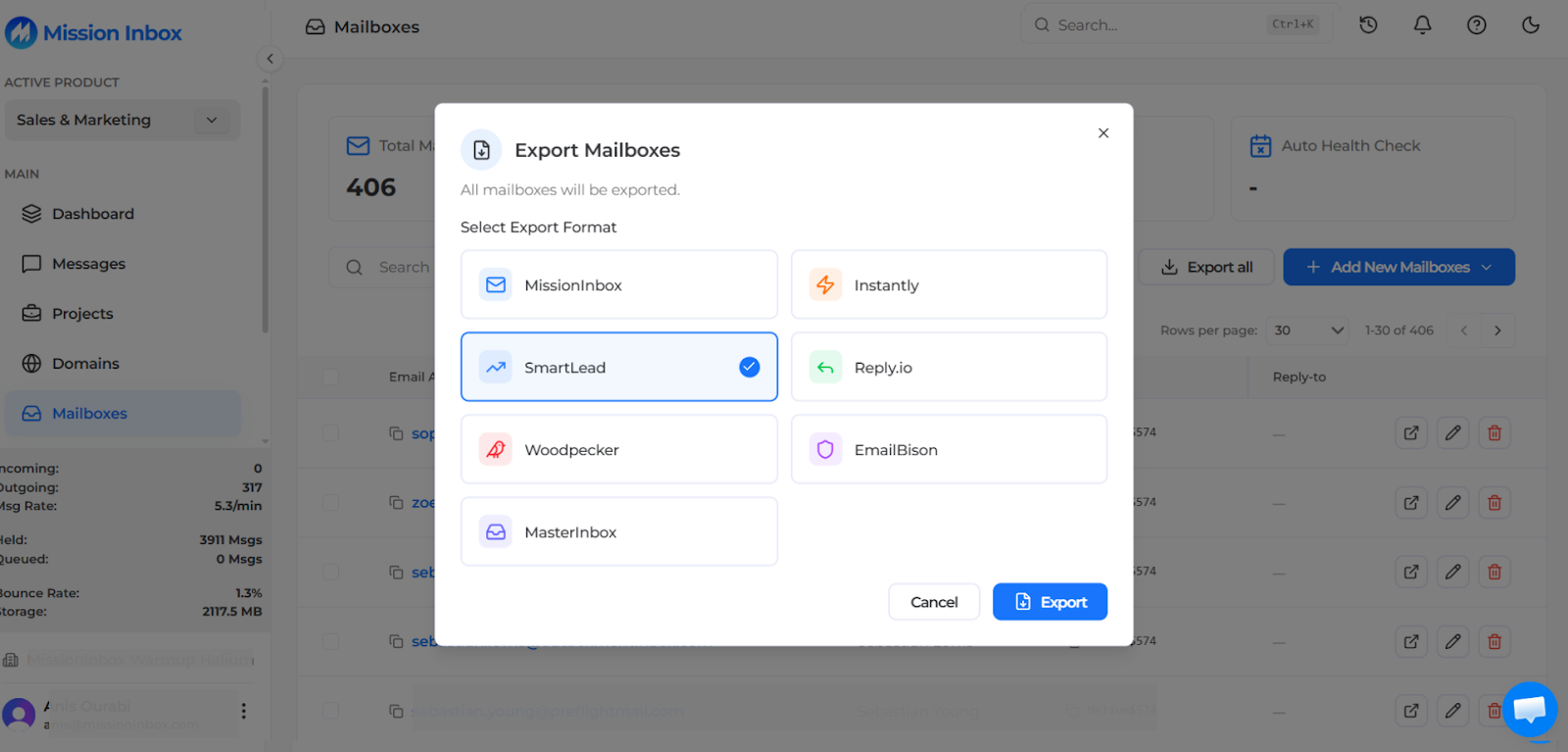
Mission Inbox has a built-in export function for Smartlead. Dashboard, click Export, select Smartlead, and it generates a CSV with every required field. Upload into Smartlead and your campaigns run on isolated infrastructure.
Why Google Workspace and Microsoft 365 Hit a Wall Under Smartlead
Smartlead's unlimited mailbox model is powerful. Connect 50, 100, or 200 accounts and distribute sending across all of them. The sequencer handles rotation automatically.
But those accounts still run on Google or Microsoft shared infrastructure. And at scale, that shared infrastructure breaks.
The Ban Cycle
Google Workspace was not built for cold outreach. When sending patterns exceed normal business communication, accounts get restricted or suspended without warning. For agencies managing client campaigns across dozens of Google accounts, replacing banned accounts becomes a recurring operational cost.
Every banned account means lost warm-up time, reconfigured DNS, and disrupted campaigns. The cycle repeats monthly.
No IP Control
Google Workspace sends from shared IPs managed by Google. You have zero visibility into which IP your emails send from, whether that IP is flagged, or who else shares it. When another Google user on the same pool triggers a blacklist, your deliverability drops without explanation.
Microsoft Filtering Is Aggressive on Shared IPs
For B2B outreach where prospects use Outlook, shared IP infrastructure is the weakest link. Microsoft's SmartScreen filter weights IP reputation heavily. Shared IPs inherit the worst sender's reputation. Enterprise environments behind Proofpoint and Barracuda are even stricter.
What Changes When You Connect Mission Inbox to Smartlead
Dedicated IPs From Day One
Every email sent through your Smartlead campaigns goes from IPs dedicated exclusively to you. No other sender shares them. No other sender's behavior affects your reputation.
Isolated Cubes for Client Separation
For agencies using Smartlead across multiple clients, each client can run in their own Isolated Cube. Separate server environment. Separate IPs. Separate reputation. One client's campaign cannot touch another's deliverability.
This is infrastructure-level isolation that Google Workspace cannot provide regardless of how many accounts you connect.
Subdomain Isolation at Scale
Send from subdomains that leverage your root domain's reputation while containing all risk. One financial services client sends 120,000 emails per day through subdomains on Mission Inbox with zero root domain damage. No other provider offers this.
MI Shield: The Pre-Send Firewall Smartlead Does Not Have
Smartlead sends whatever is queued. If one SDR writes content that triggers Microsoft's filters, the email goes out and the domain takes the hit.
MI Shield scans every outbound email before it leaves the server. Content, links, wording patterns, DNS configuration. If anything could cause damage, the send is blocked before it happens. The domain stays clean. Every other SDR on that domain stays protected.
Blacklist Monitoring Every 7 Minutes
Automatic checks across 90+ sources. If an IP gets flagged, it is removed from rotation instantly. Other IPs keep sending. Zero downtime. Your Smartlead campaigns never skip a beat from blacklist events.
Superior Microsoft/Outlook Delivery
Dedicated IPs deliver consistently through Microsoft's SmartScreen filter and enterprise gateways like Proofpoint and Barracuda. For B2B teams where prospects use Outlook, this is where the biggest deliverability gains happen.
Automated Domain Management via API
Manage hundreds of domains programmatically through Cloudflare, GoDaddy, and Spaceship. One team manages 3,000 active sending domains from a single API integration, all connected to Smartlead.
How to Connect Mission Inbox to Smartlead (5 Minutes)
- Create mailboxes in Mission Inbox. DNS auto-configures through Cloudflare, GoDaddy, or Spaceship.
- Export for Smartlead. Dashboard, click Export, select SmartLead. CSV generated with all required fields.
- Import into Smartlead. Upload the CSV. Mailboxes appear ready for campaigns.
- Send through isolated infrastructure. Smartlead sequences route through Mission Inbox's dedicated IPs and isolated servers.
No workflow changes. No new interface. Smartlead stays exactly the same. The infrastructure underneath gets dramatically better.
What About SmartServers?
Smartlead recently launched SmartServers, their own dedicated infrastructure offering. It provides dedicated IPs and server-level isolation within the Smartlead ecosystem.
SmartServers is a step in the right direction. However, there are differences worth understanding:
Mission Inbox offers subdomain isolation at the IP level. SmartServers does not. Mission Inbox includes MI Shield AI pre-send protection that scans every email before sending. SmartServers does not have an equivalent. Mission Inbox monitors blacklists every 7 minutes with automatic IP failover. Mission Inbox integrates with any sequencer (Instantly, Smartlead, ActiveCampaign, Woodpecker, Reply), not just one platform. Mission Inbox's OBM Engine API enables white-label email infrastructure for SaaS platforms building email into their product.
If your entire operation runs exclusively on Smartlead and you want everything under one roof, SmartServers is worth evaluating. If you use multiple tools, need subdomain isolation, want AI pre-send protection, or plan to scale across sequencers, Mission Inbox provides a more complete infrastructure layer.
Who This Is For
If you send 20 cold emails per day from a single account through Smartlead, your current setup works. Keep it.
This is for:
- Smartlead users sending 1,000+ emails per day who are hitting Google Workspace limitations
- Agencies running Smartlead for multiple clients who need infrastructure-level client isolation
- Teams managing 50+ email accounts spending hours weekly replacing banned Google accounts
- B2B sales teams targeting Microsoft/Outlook enterprise prospects
- Financial services teams needing compliance-grade infrastructure separation
- Any Smartlead user whose reply rates have dropped despite strong copy and clean lists
Frequently Asked Questions
Does Mission Inbox replace Smartlead?
No. Mission Inbox is the infrastructure layer underneath Smartlead. Smartlead handles sequences, campaigns, warm-up, and the unified inbox. Mission Inbox handles servers, IPs, reputation, and pre-send protection. They work together.
How do I connect Mission Inbox to Smartlead?
Create mailboxes in Mission Inbox. Click Export, select SmartLead. Upload the CSV into Smartlead. Your campaigns now send through isolated infrastructure with dedicated IPs.
What is the difference between Mission Inbox and SmartServers?
Both offer dedicated infrastructure. Mission Inbox additionally provides subdomain isolation (no other provider offers this), MI Shield AI pre-send protection, blacklist monitoring every 7 minutes with auto-failover, and compatibility with any sequencer. SmartServers works exclusively within the Smartlead ecosystem.
Will my Smartlead workflows change?
No. Same interface. Same campaigns. Same unified inbox. The only change is emails route through Mission Inbox's isolated infrastructure instead of Google or Microsoft shared systems.
Does Mission Inbox work with Smartlead's warm-up?
Yes. Smartlead's warm-up runs alongside Mission Inbox's infrastructure. Your mailboxes warm up through Smartlead while sending through Mission Inbox's dedicated IPs.
How much does Mission Inbox cost compared to Google Workspace under Smartlead?
For 5,000 emails/day, Google Workspace requires ~125 accounts at $750+/month with regular bans. Mission Inbox costs approximately $400/month with dedicated IPs, MI Shield, and zero ban risk.
Is Mission Inbox better for Outlook delivery than Google Workspace?
Yes. Dedicated IPs deliver consistently through Microsoft's SmartScreen and enterprise gateways. Google Workspace sends from shared infrastructure vulnerable to Microsoft's filtering.
Can I use both Google Workspace and Mission Inbox under Smartlead?
Yes. Many teams use a hybrid approach. Google Workspace for moderate outreach and Mission Inbox for high-value enterprise campaigns.
What is MI Shield?
MI Shield scans every outbound email before it sends. If content could trigger filters or damage reputation, the send is blocked. One SDR cannot burn the domain for the rest of the team.
How many mailboxes can Mission Inbox support under Smartlead?
From a handful to thousands. One team manages 3,000 domains through the API. No volume caps. The infrastructure scales with you.
Ready to Upgrade Your Smartlead Infrastructure?
Keep Smartlead. Keep your sequences. Keep your unified inbox. Upgrade what is underneath.