
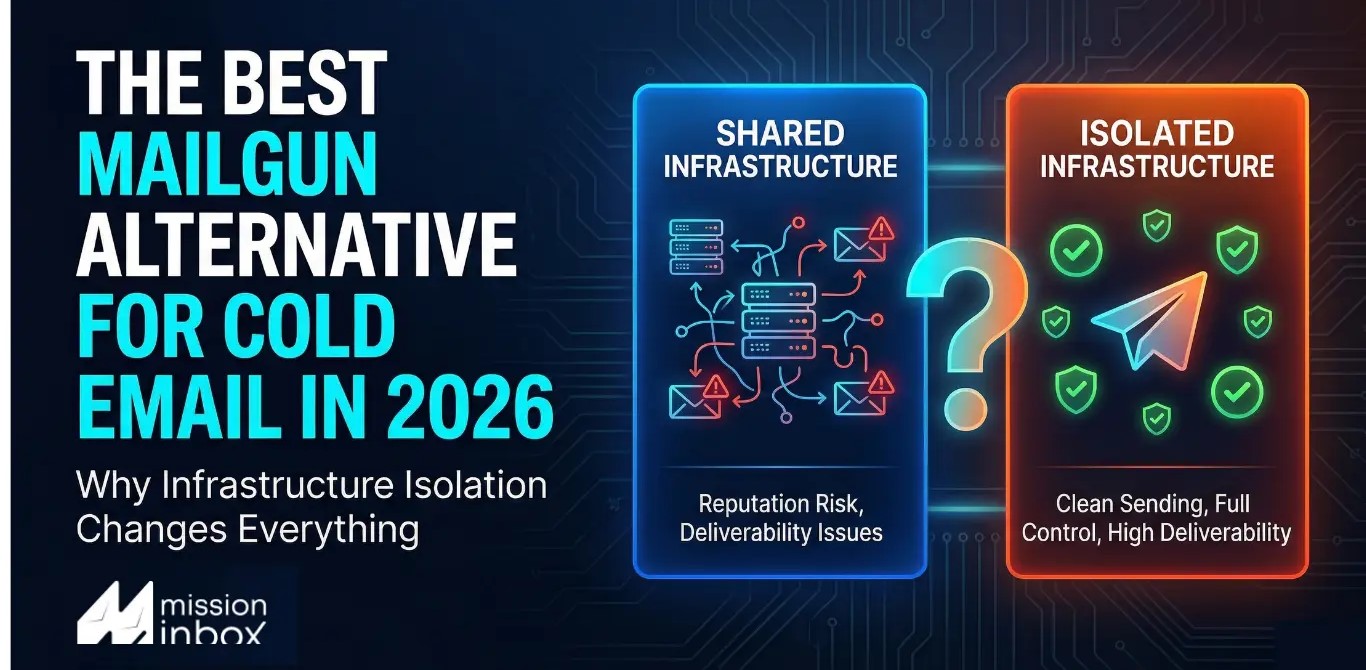

Mailgun is built for developers sending transactional email. But if your team does cold outreach, sales prospecting, or any sending where inbox placement drives revenue, Mailgun's shared IP defaults, $59/month-per-IP pricing, and pattern of suspending accounts without warning create problems that compound as you scale. Here is what is happening under the hood, and what teams are switching to instead.
The Account That Worked Fine Until It Did Not
We talk to teams every week who followed the same path.
They integrated Mailgun. The API docs were clean. Setup took an afternoon. They started sending outreach. Real cold email, real prospects, B2B companies in their ICP. Everything looked fine for a few weeks.
Then the account got suspended. No warning email. No explanation. A support ticket opened. A templated reply cited sending policy. The account was permanently disabled. The outbound pipeline stopped completely, mid-campaign.
This is not a rare edge case. It is one of the most documented patterns in Mailgun's public review history across Capterra, G2, and Trustpilot. And it applies beyond cold email: long-term paying customers running legitimate transactional email report identical outcomes, swept up by automated systems with no human review and no clear appeals path.
But suspension risk is just the émost visible symptom. The structural problem runs deeper. Mailgun was designed as a developer API for transactional mail. Its default infrastructure is shared IP pools. Your sending reputation is pooled with hundreds of other senders you will never meet. Getting off shared IPs costs $59 extra per month per IP, requires 4 to 8 weeks of manual warm-up, and is only available as a paid add-on on lower tiers.
For teams where email reaching the inbox is directly tied to pipeline, this architecture creates compounding risk. There is a different way to build this. Here is what it looks like.
Mailgun vs. Mission Inbox at a Glance
Ready to see isolated infrastructure in action?
Set up in under 5 minutes. Dedicated IPs included. AI pre-send protection from day one.
Your Emails Aren't Failing Because of Your Copy. They're Failing Because of Shared Infrastructure.
Here's a scenario that happens every week.
A team sends 50,000 emails per month through SendGrid. Clean lists. Proper SPF, DKIM, DMARC. Good content. High sender score.
Then one morning, bounce rates spike to 40%. Microsoft starts rejecting everything. Emails to Outlook, Hotmail, and Live.com addresses. Gone.
The team opens a support ticket. Days go by. No human response.
When they finally get an answer, it's this: the shared IP they've been sending from was blacklisted. Not because of anything they did. Because another sender on the same IP pool was flagged.
The fix SendGrid offers? Upgrade to a Pro plan with a dedicated IP. Pay more to escape a problem the platform created.
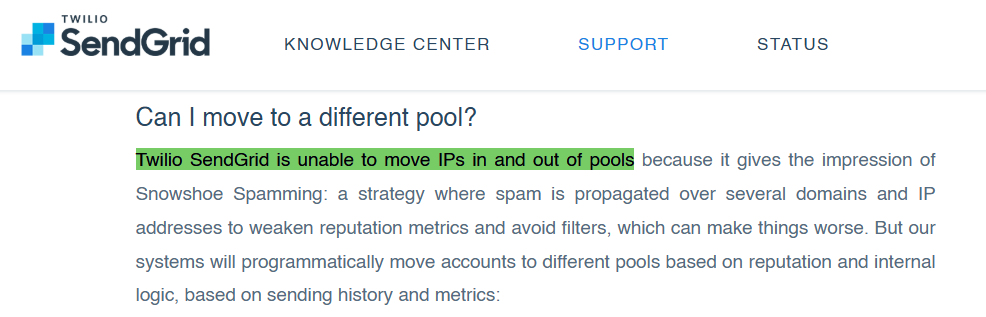
If your IP gets hit, you're stuck. There's no manual override.
This isn't a rare edge case. In early 2025, Microsoft rejected all SendGrid shared-IP traffic for approximately 36 hours. Thousands of legitimate senders were blocked because of the actions of others in their pool.
If your business depends on emails reaching the inbox, whether that's cold outreach, sales sequences, client communication, or financial notifications, shared infrastructure is a ticking time bomb.
There's a fundamentally different approach: isolated infrastructure with dedicated IPs, where your sending reputation belongs to you alone.
SendGrid vs. Mission Inbox at a Glance
For teams evaluating a SendGrid alternative, here's the direct comparison:
→ Start Sending with Mission Inbox | Book a 45-Min Walkthrough
Why Teams Are Moving Away from SendGrid in 2026
SendGrid processes billions of emails. It's a proven platform for transactional email: password resets, order confirmations, shipping notifications. For that use case, it works.
But for teams doing cold outreach, sales prospecting, or any high-volume email that requires consistent reply rate, SendGrid's architecture creates problems that get worse as you scale.
The Shared IP Problem
When you send through SendGrid on their free or Essentials plan, your emails go out from a shared IP pool. That means your emails share the same IP address with hundreds or thousands of other senders.
If one of those senders triggers a blacklist, and on a pool that large, someone eventually will, your deliverability drops with it. Your sender score could be 99%, your content could be perfect, and your emails still land in the wrong folder because of someone else's behavior.
SendGrid's own support team. Their words, not ours.
IPs with strangers. Stop wondering why your emails aren't reaching the inbox. Stop fighting a platform that wasn't built for what you need.
Start Sending → Set up in under 5 minutes. Isolated servers. Dedicated IPs. AI protection.
Book a 45-Min Walkthrough → Talk to our team. See Isolated Cubes, MI Shield, and dedicated IPs in action.
Why Teams Are Moving Away from Mailgun in 2026
Mailgun processes email at scale and its API is well-documented. For a developer team handling pure transactional mail, it works. But four structural problems appear consistently as teams use it for outreach, prospecting, or any sending tied directly to revenue.
Problem 1: Shared IPs Are the Default
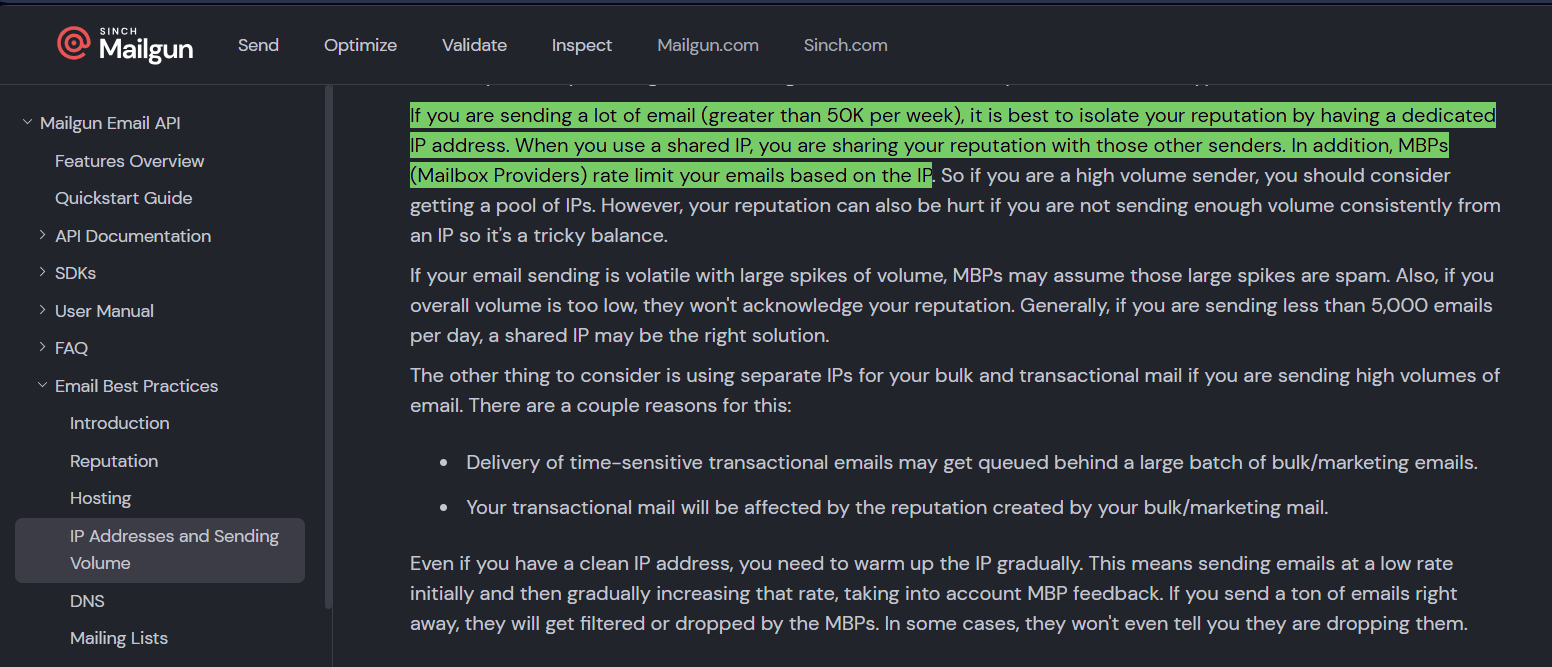
On every Mailgun plan below Scale, emails go out from shared IP pools. Mailgun's own support documentation confirms this and explains that IP reputation is shared among all senders on the same pool. The same documentation recommends getting a dedicated IP for anyone sending more than 50,000 emails per week, meaning for any meaningful outreach operation, Mailgun's own team is telling you their default setup is not designed for what you are doing.
Problem 2: Cold Email Gets Accounts Suspended Without Warning
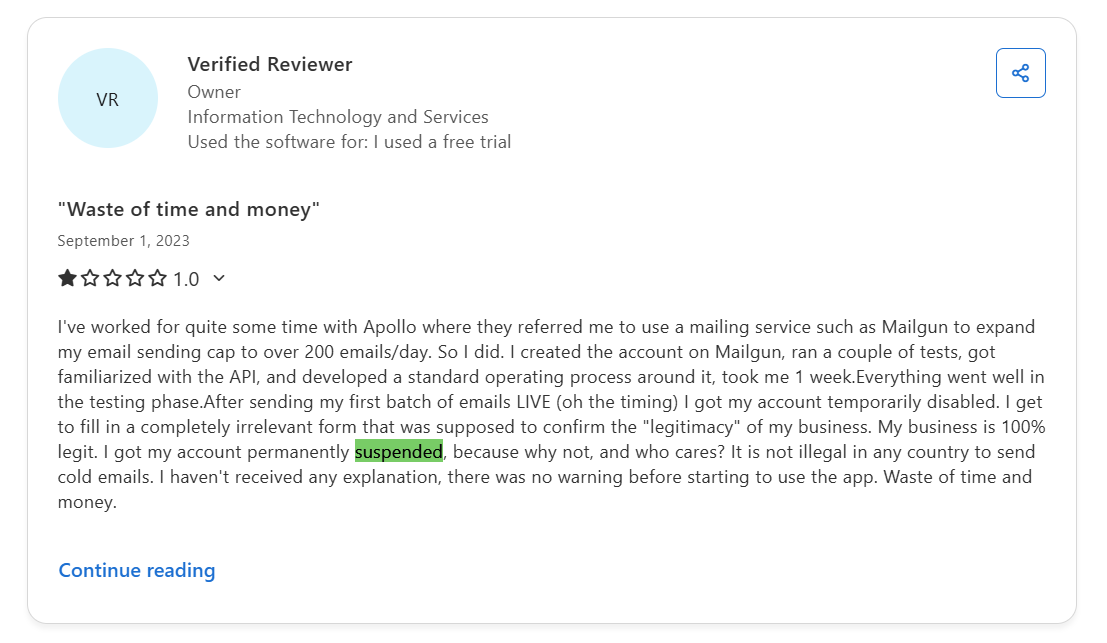
This is the most consistent theme across every public Mailgun review platform. Teams doing cold outreach have accounts flagged by automated systems and suspended without explanation
Problem 3: Outlook and Microsoft Delivery Is a Documented Pain Point
Microsoft's filtering is particularly aggressive toward email sent from shared IP pools. Its SmartScreen filter weights IP reputation heavily, meaning anyone else on your shared pool who triggers a flag affects your Outlook deliverability, regardless of your individual sending quality.
For B2B sales teams prospecting into enterprise accounts where Outlook is standard, this is the entire deliverability problem in one sentence.
Problem 4: No Pre-Send Protection
Mailgun has no equivalent to a pre-send firewall. Once an email is queued, it sends. There is no AI layer reviewing outgoing content for patterns that trip spam filters, links that damage domain reputation, or DNS misconfigurations before the email even leaves the server.
The result: one team member sends content that flags Microsoft's filters, and the domain's reputation drops over the next 72 hours while you wonder why open rates collapsed. By the time the impact shows up in metrics, the damage is already compounding.
How Mission Inbox Solves Each of These Problems
Isolated Cubes: Your Own Server Environment for Every Workload
Mission Inbox's Isolated Cubes give each email workload its own dedicated server environment. Sales outreach runs on completely separate infrastructure from marketing campaigns, which runs separately from transactional and financial emails.
A marketing campaign that generates complaints has zero effect on your sales outreach deliverability. If one workload has a bad day, the others never feel it. The damage radius is contained by architecture, not by monitoring after the fact.
Subdomain Isolation: The Feature No Other Provider Offers
Mission Inbox is the only email infrastructure provider offering true subdomain isolation at the IP level. Each workload sends from subdomains that leverage your root domain's established reputation while keeping all risk completely contained.
One financial services client sends 120,000 emails per day from subdomains with zero reputation damage to their root domain. If any subdomain runs into issues, the root domain and every other subdomain remain completely unaffected. This is architectural protection built into the infrastructure, not a configuration option.
MI Shield: AI Protection Before the Email Leaves the Server
MI Shield is an AI-powered firewall that scans every outbound email before it enters the sending queue. It checks content structure, link safety, wording patterns, and DNS configuration in real time. If anything could trigger spam filters or damage your domain reputation, the email is blocked before it ever sends.
The scenario it prevents: one SDR sends content that trips Microsoft's filters, and the entire domain's reputation drops over the following 72 hours. With MI Shield, that send never happens. The domain stays clean.
Blacklist Monitoring Every 7 Minutes With Automatic Failover
Mission Inbox monitors blacklists automatically every 7 minutes across 90+ sources. If an IP gets flagged, it is removed from rotation instantly. Other IPs continue sending without interruption. No support ticket. No waiting. Zero downtime.
Mailgun's approach on shared pools is reactive. Their team works to delist IPs when flagged, but certain blacklist services do not allow manual delisting and the automatic turnover takes 24 to 48 hours. During that window, your emails fail. There is no failover.
Superior Microsoft and Outlook Delivery
Where shared IP infrastructure is most vulnerable, Mission Inbox's isolated architecture is strongest. Pre-warmed dedicated IPs deliver consistently to Outlook, Hotmail, and Live.com addresses including enterprise environments behind Proofpoint and Barracuda. For B2B teams where prospects live in Outlook, this is often the deciding factor.
Automated Domain Management via API
Agencies and teams managing multiple domains do not configure DNS records manually. Mission Inbox's API integrates directly with Cloudflare, GoDaddy, and Spaceship for programmatic domain creation and DNS configuration. One team member manages 3,000 active sending domains from a single script. Scale from 10 domains to 100+ without touching a DNS setting.
Complementary to Your Existing Stack
Mission Inbox does not replace Instantly, Smartlead, or ActiveCampaign. It sits underneath them as the SMTP delivery layer. You keep every workflow you have already built. Connect Mission Inbox as the infrastructure that gets those emails into the inbox through isolated servers and dedicated IPs.
See how isolated infrastructure works for your setup.
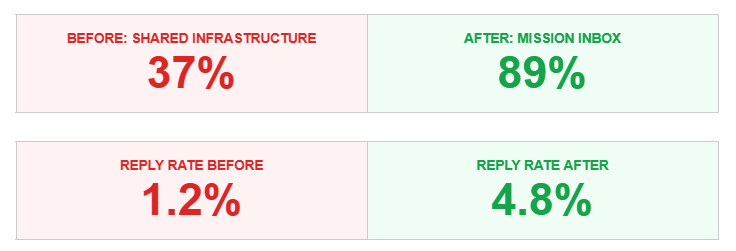
What Customers Experience After Switching
The shift from shared to isolated infrastructure produces measurable results, often with the same email copy and the same prospect lists. The only variable that changes is the infrastructure underneath.
Who Should Stay with Mailgun (Honestly)
Mailgun is a legitimate platform for specific use cases. If the following describes your operation, it is a reasonable choice.
Stay with Mailgun if:
- You only send transactional email: password resets, app notifications, order confirmations
- You have a dedicated developer managing deliverability full time
- You never do cold outreach, sales prospecting, or any unsolicited email
- You are comfortable with shared IP risk on lower plan tiers
- You do not send significant volume to Microsoft or Outlook addresses
Switch to Mission Inbox if:
- You do cold email, outreach, or prospecting and need a platform that supports it
- You want dedicated IPs included, not a $59/month add-on
- You need workload isolation: sales separate from marketing separate from transactional
- You want AI pre-send protection so one bad email cannot damage your domain
- You send to Microsoft or Outlook addresses at volume
- You are an agency managing multiple client campaigns at infrastructure level
- You are a SaaS platform that needs white-label email infrastructure via API
- You are in financial services where email delivery has compliance implications
Frequently Asked Questions
Is Mailgun good for cold email?
Mailgun restricts unsolicited email in its Terms of Service, and accounts used for cold outreach are routinely suspended without warning, even when the sending is entirely legitimate. This pattern is documented repeatedly in verified reviews on Capterra, G2, and Trustpilot. Mailgun was designed as a transactional email API for developers. Teams doing cold outreach need infrastructure built for that use case, where outreach is an expected and supported workflow rather than a policy risk.
What is the main difference between Mailgun and Mission Inbox?
Mailgun uses shared IP pools by default. Your sending reputation is shared with hundreds of other senders, and their behavior affects your deliverability. Mission Inbox provides isolated infrastructure with dedicated IPs included in every plan. Mission Inbox also includes MI Shield (AI pre-send protection), subdomain isolation, and automatic 7-minute blacklist monitoring with auto-failover, none of which are available on Mailgun's standard tiers.
How much does a dedicated IP cost on Mailgun?
Mailgun charges $59/month per dedicated IP as an add-on on lower plans. One dedicated IP is included on the Scale plan starting at $90/month. Either way, that IP requires a 4 to 8 week warm-up process before it reaches full performance because it starts with zero sending history. Mission Inbox includes dedicated pre-warmed IPs with every plan. You send at full performance from day one.
Can I use Mission Inbox with Instantly or Smartlead?
Yes. Mission Inbox provides the SMTP infrastructure underneath your existing sequencer. You keep Instantly, Smartlead, ActiveCampaign, or whatever tool you use for writing and scheduling sequences. Mission Inbox handles the delivery layer through isolated servers with dedicated IPs. No workflow changes needed. Connect Mission Inbox as your SMTP provider and your sequencer sends through it.
How long does it take to switch from Mailgun to Mission Inbox?
Setup takes under 5 minutes. DNS is configured automatically through Cloudflare, GoDaddy, or Spaceship. Mission Inbox IPs arrive pre-warmed with established Talos/Cisco reputation scores, so there is no warm-up period required. You send at full deliverability on day one. Mailgun's dedicated IP warm-up, by contrast, takes 4 to 8 weeks of careful volume management.
Does Mission Inbox use shared IPs?
No. Every customer gets dedicated IPs. Your sending reputation is exclusively yours. No other sender's behavior can affect your deliverability. This is architecturally different from Mailgun's default model on plans below Scale, where your emails share IP addresses with hundreds of other senders.
What is subdomain isolation and why does Mailgun not offer it?
Subdomain isolation separates your email workloads onto different subdomains of your root domain, each on dedicated IPs with completely isolated reputation. If one workload runs into issues, the others and your root domain remain completely unaffected. Mission Inbox is the only provider offering true subdomain isolation at the IP level. Mailgun does not offer this. All sending workloads share the same infrastructure pool.
What is MI Shield?
MI Shield is an AI-powered firewall that scans every outbound email before it leaves the server. It checks content structure, link safety, wording patterns, and DNS configuration in real time. If anything could trigger spam filters or damage your domain reputation, the email is blocked before it sends. Mailgun has no equivalent. Emails go out unchecked and deliverability problems surface after the damage is already done.
How does Mission Inbox handle blacklists compared to Mailgun?
Mission Inbox checks for blacklists automatically every 7 minutes across 90+ sources. If an IP gets flagged, it is removed from rotation instantly and other IPs continue sending with zero interruption. Mailgun's blacklist management on shared pools is reactive. Their team works to delist IPs after flagging, but certain services do not allow manual delisting and automatic turnover takes 24 to 48 hours. There is no automatic failover during that window.
Is Mission Inbox better for Microsoft and Outlook delivery than Mailgun?
Yes. Mission Inbox's isolated architecture with pre-warmed dedicated IPs delivers consistently to Outlook, Hotmail, and Live.com addresses, including enterprise environments behind Proofpoint and Barracuda. Mailgun users on shared IP pools frequently report Outlook emails landing in junk despite clean domains because Microsoft's filtering weights IP reputation heavily, and shared IPs are inherently vulnerable to other senders affecting that reputation score.
Ready to Own Your Email Infrastructure?
Stop sharing IPs with strangers. Stop worrying about account suspensions. Start sending on infrastructure built for what you actually need. Trusted by 100+ companies sending 50M+ emails monthly.