

Dedicated IP vs. Shared IP: Which Is Best for Email and Hosting?
Understanding the difference between shared and dedicated IP addresses is crucial because your choice directly dictates the control you have over your email deliverability, security profile, and overall sending reputation. You need to assess the core trade-offs between cost savings and isolation, review how each environment handles the inevitable risk of bad neighbors, and determine the necessary effort for reputation management. This evaluation will guide you toward the infrastructure that best supports your current and future sending volumes, especially as you consider the practical steps for IP warm-up and the common technical myths that often cloud this decision. Evaluating the financial implications and setup difficulty ensures you select a scalable foundation for reliable communication.
Key Differences Between Shared and Dedicated IP Addresses
Understanding the technical setup of your email infrastructure is the first step toward mastering your inbox placement. The primary difference lies in how many senders are utilizing the same numerical address to route their mail to recipients.
What is a Shared IP Address?
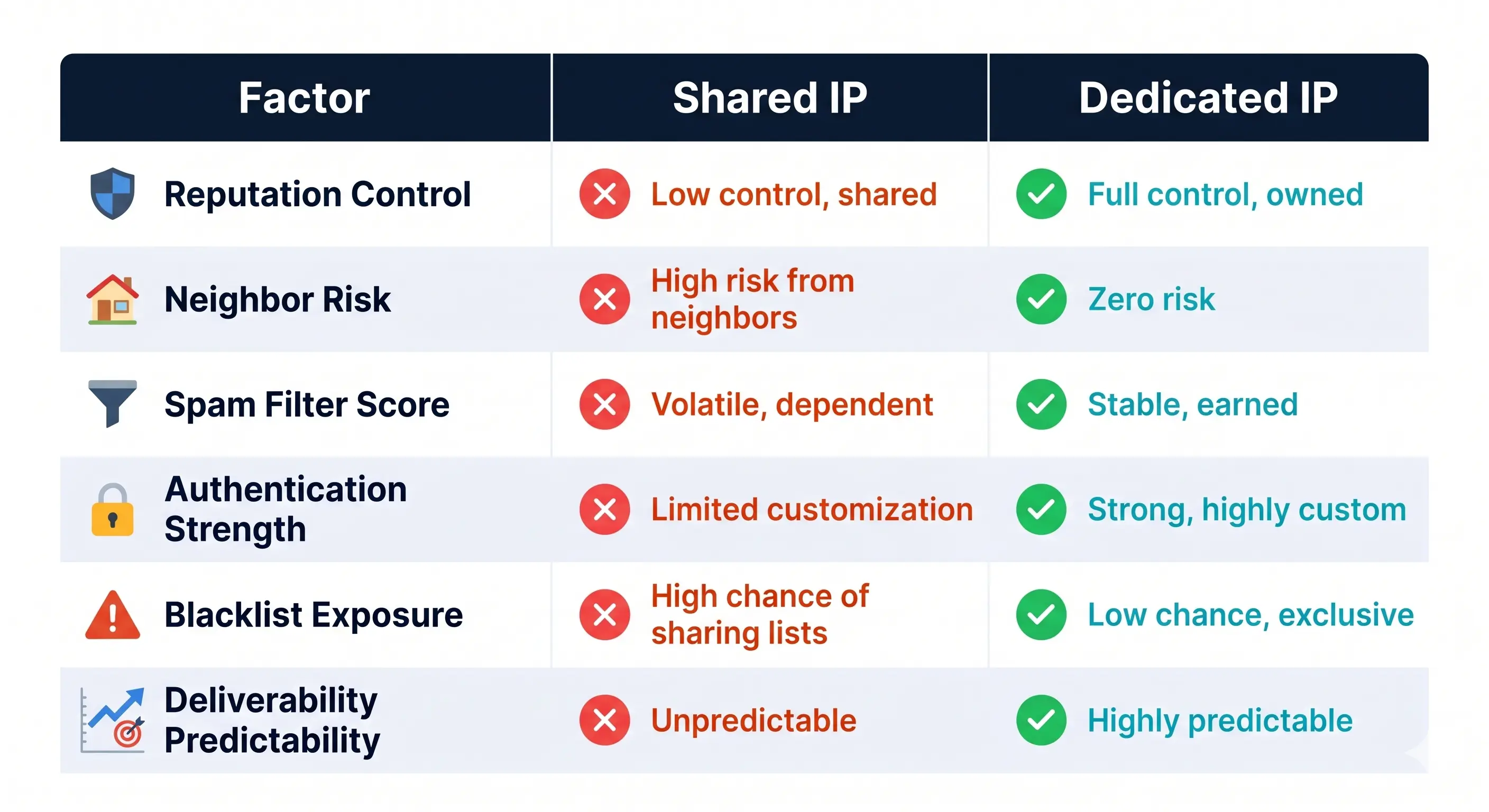
A shared IP address is a single IP used by multiple different senders simultaneously. Most entry-level Email Service Providers (ESPs) put new users on shared IPs by default. This allows the provider to aggregate small volumes of mail into a single stream, making it a cost-effective solution for many.
However, your reputation is tied to the behavior of others. If a "neighbor" on your shared IP sends spam, it can negatively impact your own Deliverability Testing results and cause your emails to land in the spam folder.
What is a Dedicated IP Address?
A dedicated IP address is a unique IP assigned exclusively to your organization. No other sender can use it, meaning you have 100% control over the sending reputation associated with that address.
This setup is ideal for businesses that require high levels of predictability and security. Because you are the only one sending from this IP, your Deliverability Testing scores will reflect your own sending habits alone, rather than a communal average.
Quick Comparison: When to Use Which
Choosing between a shared or dedicated IP depends on your specific sending volume and business goals. Use the following guide to determine which infrastructure fits your current needs:
- Small Blogs & Personal Branding: A shared IP is usually sufficient. When you send fewer than 5,000 emails per month, you likely won't generate enough "heat" to maintain a dedicated IP’s reputation on your own.
- High-Volume E-commerce: A dedicated IP is essential. Large retailers sending daily transactional and promotional emails need consistent reputation management to ensure receipts and shipping updates reach the inbox.
- Mass Marketing Campaigns: If you are running high-scale outreach, a dedicated IP (or a pool of them) is necessary to prevent shared-environment throttling and to isolate your marketing traffic from other business communications.
- Low-Frequency Newsletters: If you only send once a month, a shared IP is safer. Dedicated IPs can "go cold" if they aren't used regularly, which can cause ISPs to view sudden bursts of traffic as suspicious.
- Enterprise-Level Security: Organizations with strict compliance needs should choose a dedicated IP to ensure total oversight of their digital footprint and easier troubleshooting of technical headers.
.jpg)
Impact on Email Deliverability and Spam Filters
Will a Dedicated IP Prevent Emails from Going to Spam?
A dedicated IP gives you complete control over your sender reputation, but it is not a magic wand that automatically bypasses spam filters. While it isolates you from the mistakes of others, your deliverability still depends on your own sending practices, such as maintaining low bounce rates and high engagement.
To ensure your emails land in the inbox, a dedicated IP must be paired with proper technical authentication. This includes setting up SPF, DKIM, and DMARC records. When these protocols are combined with a clean IP, ISPs (Internet Service Providers) like Gmail and Outlook can verify your identity more easily, which significantly reduces the likelihood of your emails being flagged as spam.
The Risk of Shared IP Neighbors (The 'Bad Neighbor' Effect)
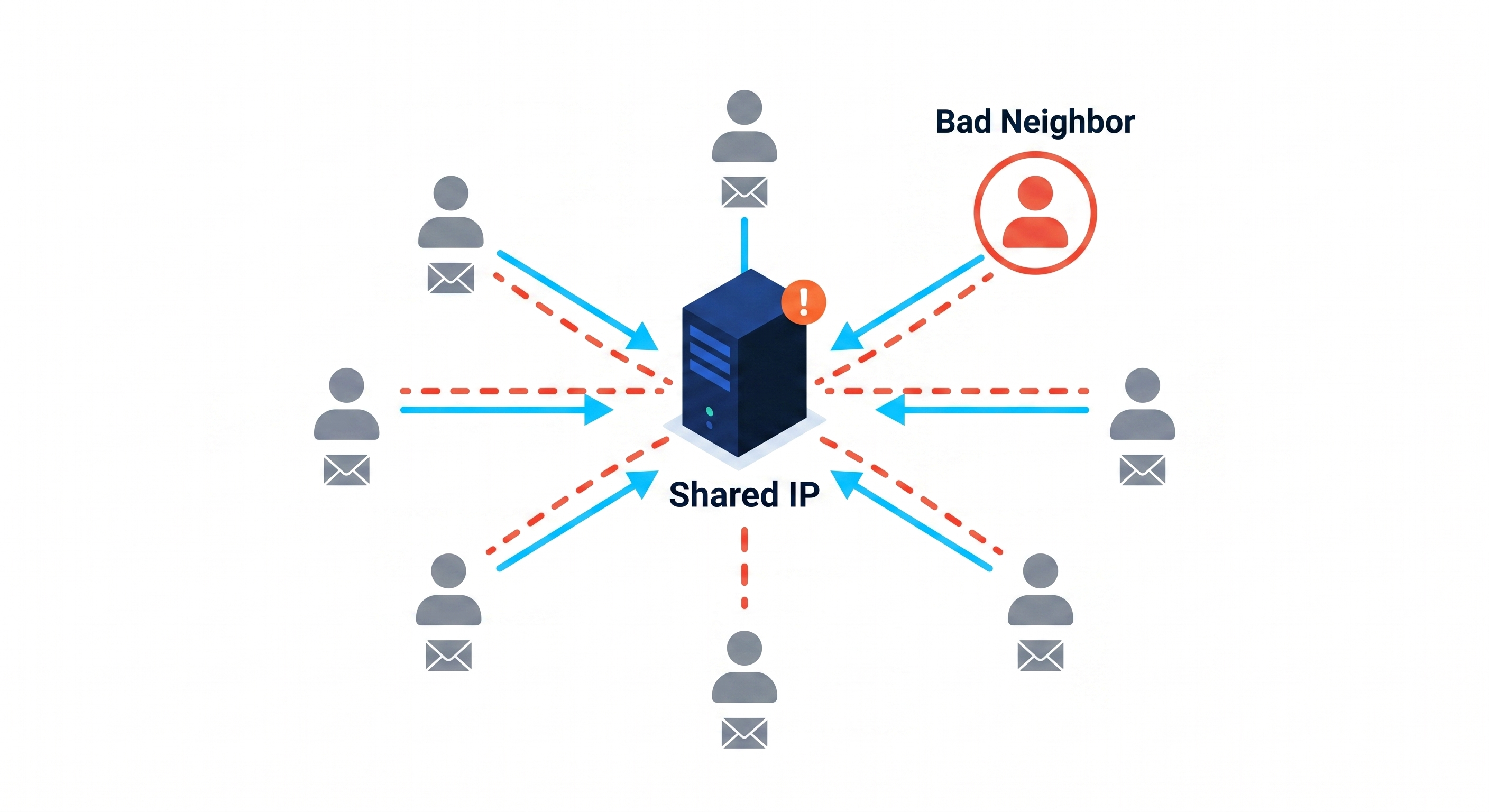
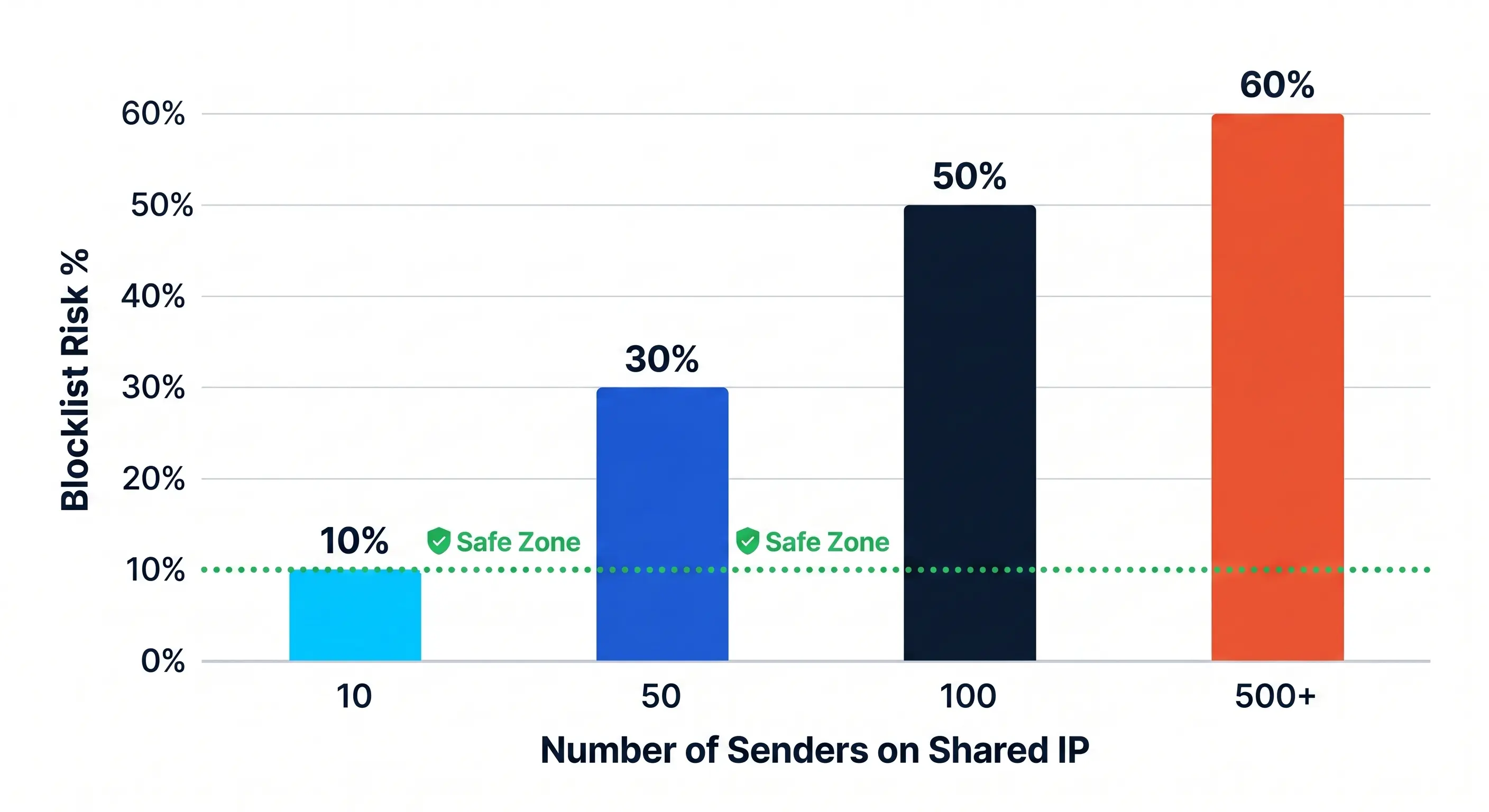
The "bad neighbor" effect is one of the most significant risks of using a shared IP. In this environment, you are sharing a single IP address with dozens or even hundreds of other senders.
If just one of those senders—your "neighbor"—blasts out a high volume of spam or uses a purchased email list, the entire IP address can be blacklisted by ISPs. Because you share that same address, your legitimate emails may be blocked or sent straight to the spam folder, even if your own sending habits are perfect.
The impact of this shared risk is backed by industry data. According to the [Validity 2023 Blacklisting Report](https://www.validity.com/), shared IP environments are significantly more vulnerable to reputation damage, with data showing that bad neighbors can cause deliverability rates to drop by as much as 10% for innocent senders caught in the crossfire. This "collateral damage" is a primary reason why high-volume senders eventually migrate to dedicated infrastructure to protect their revenue and reach.
Managing Your Own IP Reputation and the Warm-up Process
When comparing a dedicated IP vs shared IP, the primary advantage of the dedicated route is complete control. However, this control comes with the significant responsibility of reputation management. Unlike a shared IP where the provider handles the "heavy lifting" of maintaining the IP's health, a dedicated IP starts as a blank slate—or a "cold" IP—that must be carefully nurtured to earn the trust of Internet Service Providers (ISPs) like Google, Outlook, and Yahoo.
How to Manage Your Own IP Reputation
Maintaining a high sender reputation requires a multi-layered approach to email hygiene and technical compliance. Because you are the sole sender on the address, any mistake—such as a sudden spike in complaints or a high bounce rate—will impact you directly and immediately.
To keep your reputation pristine, you must:
- Monitor Engagement Metrics: ISPs prioritize emails that users actually interact with. High open and click-through rates signal that your content is wanted.
- Implement Technical Authentication: Ensure SPF, DKIM, and DMARC records are correctly configured to prove your identity.
- Practice List Hygiene: Regularly remove inactive subscribers and hard bounces to prevent being flagged by spam traps.
- Follow Best Practices: Adhering to 7 ways to avoid the spam folder is essential for any sender transitioning to a dedicated environment.
The Process for Warming Up a New Dedicated IP (Table)
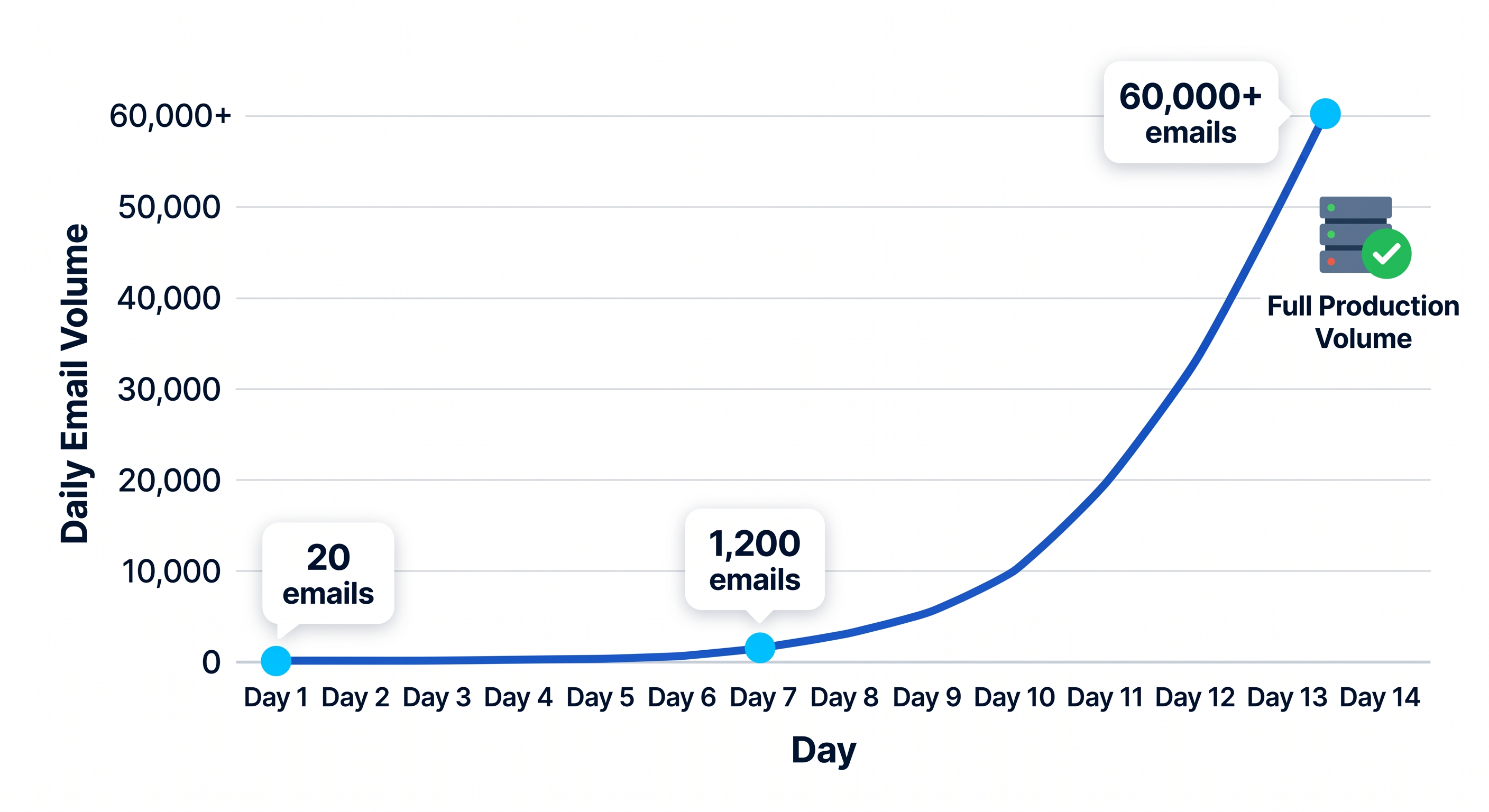
You cannot simply start sending 100,000 emails on day one with a new dedicated IP. If you do, ISPs will likely flag the activity as "spam-like" behavior and block your messages. IP warming is the deliberate process of increasing your email volume over several weeks to establish a legitimate sending history.
The following table provides a recommended volume progression for the first 14 days of a warm-up phase.
The Critical Need for Sending Consistency
ISPs look for predictability. A sender who sends 50,000 emails every Tuesday is viewed more favorably than a sender who sends 200,000 emails once a month and nothing in between. Erratic sending patterns are a major red flag for spam filters.
Once you have completed the warm-up process, your goal is to maintain a consistent sending cadence. If your business needs require a massive one-time spike—such as for a Black Friday sale—you must plan for it by gradually ramping up your volume in the days leading up to the event. In the dedicated ip vs shared ip debate, consistency is the price of the superior deliverability that a dedicated IP provides. If you cannot maintain a steady volume, a shared IP may actually be the safer choice for your brand's long-term reach.
SEO, Security, and Website Infrastructure Myths
There is a significant amount of outdated information regarding how IP addresses impact website performance and safety. In the early days of the web, technical limitations made dedicated IPs a necessity for certain functions, but modern standards have changed the landscape entirely.
Does a Dedicated IP Improve SEO?
One of the most persistent myths in digital marketing is that a dedicated IP address provides a direct boost to search engine rankings. The theory suggests that search engines prefer "exclusive" sites or that being on a shared IP with low-quality sites might result in a "guilt by association" penalty.
However, Google has repeatedly confirmed that an IP address is not a ranking factor. According to a detailed Search Engine Journal analysis, having a dedicated IP has no direct impact on your organic search performance. Search engines are designed to crawl and index domains, not individual server addresses. As long as your site is accessible and fast, Google does not care if you share an IP with 500 other websites.
The only indirect SEO benefit of a dedicated IP is if it allows for faster server response times or prevents downtime during massive traffic spikes—but even then, the performance of the server hardware and software matters more than the IP itself.
Security Benefits: Is it Dangerous to Share an IP?
Many users worry that if a "neighbor" on a shared IP gets hacked or hosts malicious content, their own site will be compromised. This is generally a misconception.
While IP blacklisting can occasionally happen at the network level, most modern security protocols operate at the application or domain level.
- Isolation: On a properly configured shared server, accounts are isolated. A security breach on one site does not grant access to another site on the same IP.
- Firewalls: Modern web application firewalls (WAFs) filter traffic based on domain-specific patterns, protecting your site even if a neighbor is under attack.
In the context of email infrastructure, the security concern shifts toward reputation. If you use a shared IP for sending email, you are sharing a "sender reputation." This is why platforms like MissionInbox emphasize the importance of monitoring email deliverability metrics to ensure that a neighbor's poor habits don't lead to your messages landing in the spam folder.
SSL Certificates and Modern Hosting (SNI Explained)
A decade ago, you had to purchase a dedicated IP address if you wanted to install an SSL certificate (HTTPS). This was because the server needed to know which certificate to show a visitor before it knew which website the visitor wanted to see.
This changed with the introduction of Server Name Indication (SNI). Here is a simplified breakdown of how SNI works and why it makes dedicated IPs optional for security:
- The Old Way: A server could only "see" the IP address being requested. Because it didn't know the specific domain name yet, it could only provide one SSL certificate per IP. This meant every secure site required its own unique address.
- The SNI Way: Think of SNI as a digital receptionist. When a visitor's browser connects to the server, SNI allows the browser to mention the specific website name during the initial handshake.
- Multi-Tenancy: Because the server now knows the domain name immediately, it can grab the correct SSL certificate from a pile of many.
- The Result: You can now host hundreds of secure websites with individual SSL certificates on a single IP address without any security warnings or technical conflicts.
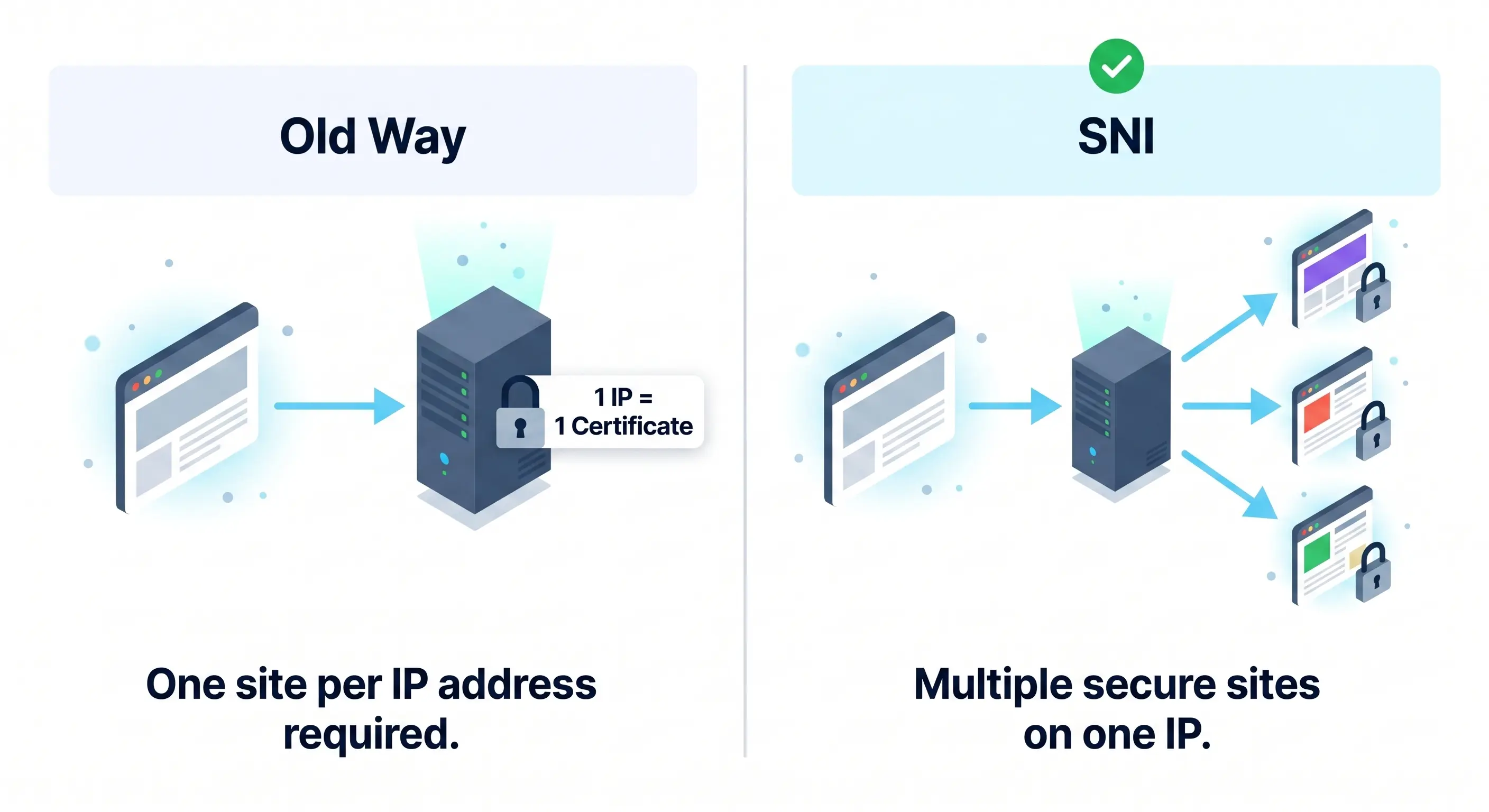
For most website owners, the move to SNI has eliminated the primary technical reason for needing a dedicated IP, allowing for more efficient use of IPv4 resources and lower hosting costs.
Evaluating Costs, Setup, and Scaling Requirements
Is it Hard to Set Up a Dedicated IP?
Transitioning to a dedicated IP requires more technical heavy lifting than remaining on a shared pool. While shared IPs are "plug-and-play" environments where the provider manages the reputation and configuration, a dedicated IP puts the driver’s seat in your hands.
You must handle the initial technical configuration, including updating your DNS records for SPF, DKIM, and DMARC to authorize the new IP. Beyond the initial setup, the most critical phase is the IP warm-up. Because the IP has no historical "trust" with ISPs (like Gmail or Outlook), you must gradually increase your sending volume over 30 days to avoid being flagged as a spammer.
During this sensitive period, lead quality is vital. Using a verified lead source like Prospeo helps ensure that your initial batches are sent to high-quality, valid addresses, reducing the risk of bounces that could ruin your new IP's reputation before it is fully established.
Pricing: Monthly Cost Differences
Budget is often the deciding factor for smaller businesses. Because shared IPs distribute infrastructure costs across thousands of users, they are significantly more affordable.
- Shared IP Costs: Typically included in the base price of your email service provider (ESP) plan. Entry-level tiers often range from $0 to $30 per month, making them ideal for startups and low-volume senders.
- Dedicated IP Costs: Generally treated as a premium add-on. The industry average for a single dedicated IP is between $20 and $50 per month, which is added on top of your existing subscription costs. High-volume enterprise senders may pay significantly more for managed services or multiple IPs to segment different types of traffic.
Scaling: When to Switch (Volume Guide)
The decision to switch is usually triggered by your monthly sending volume. If you send too little on a dedicated IP, ISPs may view your "bursty" traffic as suspicious. If you send too much on a shared IP, you become more vulnerable to the mistakes of other senders in your pool.
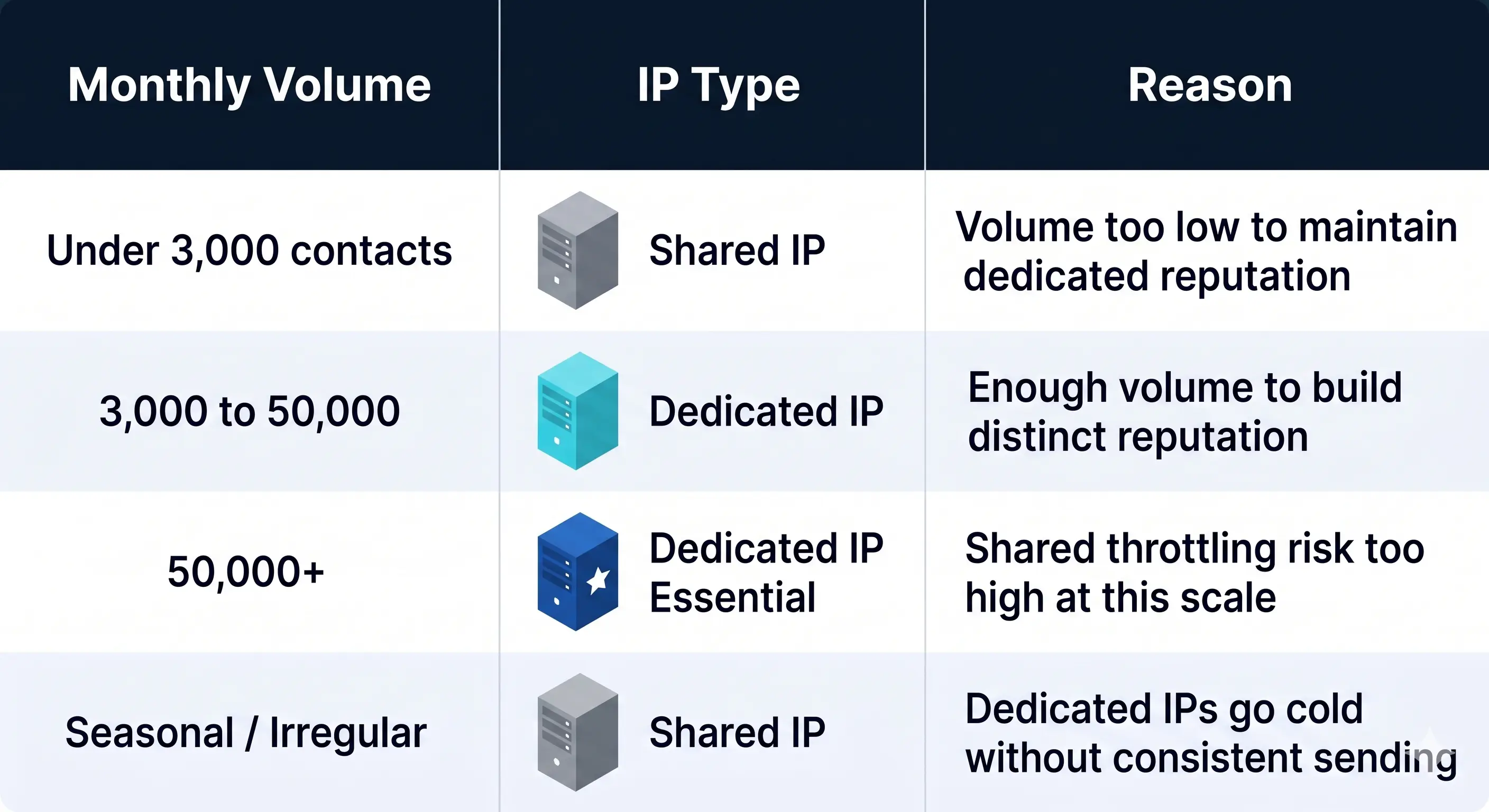
Follow these volume-based guidelines to determine your infrastructure needs:
- Under 3,000 contacts per month: Stick with a Shared IP. Your volume is likely too low to maintain the consistent "heartbeat" required to keep a dedicated IP warm.
- 3,000+ contacts per month: This is the threshold where a transition to a dedicated IP is recommended. At this volume, you have enough data to build a distinct reputation and the volume to keep the IP active in the eyes of ISPs.
- 50,000+ emails per month: A Dedicated IP is considered essential. At this scale, the risk of being throttled due to a "noisy neighbor" on a shared pool is too high, and the monthly cost becomes a negligible part of your overall ROI.
- Inconsistent/Seasonal Senders: Regardless of volume, if you only send once every few months, a Shared IP is better suited to your needs, as it doesn't require the constant maintenance of a dedicated reputation.
How Advanced AI Protection Integrates with Dedicated Infrastructure
Dedicated IPs give you complete control, but AI provides the strategic defense. While a dedicated IP isolates your reputation from other users, it doesn't automatically protect you from external threats or internal errors. Mission Inbox layers advanced AI directly onto your dedicated infrastructure to act as a 24/7 guardian. This AI analyzes outgoing traffic patterns to ensure your volume and content never trigger automated spam filters.
The Intersection of AI and Dedicated IPs
A dedicated IP is a powerful tool, but it is also a sensitive one. Without oversight, a sudden surge in volume can look like a botnet attack to receiving servers. AI bridges this gap by managing the rhythm of your infrastructure.
At Mission Inbox, our AI layers monitor the health of your dedicated environment in real-time. The system learns the "normal" behavior of your IP and flags deviations before they result in a block. By combining isolated hardware with intelligent software, you get a sending environment that is both exclusive and self-healing.
Protecting High-Volume Senders with Predictive Monitoring
For high-volume senders, reputation is a fragile asset. Maintaining a pristine sender score requires predictive intelligence, not just reactive troubleshooting.
Mission Inbox leverages real-time threat and reputation data from Barracuda Networks to preemptively protect your dedicated IP reputation. Our AI scans global threat signals and blocklist databases to identify risks before they impact your deliverability.
.jpg)
If the system detects a potential reputation drop, the AI automatically adjusts sending parameters. This might include slowing down the delivery rate or identifying specific content patterns that correlate with high bounce rates. By using Barracuda's data to inform our AI layers, we ensure your infrastructure stays off the blocklists and in the inbox. This proactive monitoring turns your dedicated IP into a resilient asset that scales alongside your business.
Dedicated vs Shared IP FAQs
Do I need a dedicated IP for an SSL certificate?
No. Modern web standards like SNI (Server Name Indication) allow multiple SSL certificates to be hosted on a single IP address. Most hosting providers now support SNI, meaning you can secure your site with full encryption without the additional cost or technical requirement of a dedicated IP.
Can a bad neighbor on a shared IP affect my site's ranking?
Generally, no. Search engines like Google understand that millions of websites use shared hosting environments. A bad neighbor engaged in spam or malicious activity might get their specific domain penalized, but it rarely affects other legitimate sites on the same IP. However, if the entire IP is blacklisted due to extreme abuse, it could impact your site's accessibility to certain users.
Are dedicated IPs more trackable than shared IPs?
Yes, in the sense that all traffic from that IP is definitively linked to your organization. On a shared IP, traffic is aggregated from many different users, providing a level of anonymity. For businesses, this direct link is often a benefit because it allows you to build a clear, verifiable reputation with ISPs and mail servers that is not diluted by outside parties.
Does a dedicated IP improve my website's SEO?
A dedicated IP is not a direct ranking factor for search engines. While it provides a more stable environment and avoids the minor risks of shared IP blacklisting, switching to one will not automatically boost your position in search results. SEO success depends much more on content quality, site speed, and mobile optimization than on your IP configuration.
How much does a dedicated IP cost?
Costs vary depending on the provider and the specific service type. For standard web hosting, a dedicated IP typically ranges from $2 to $10 per month. For email sending services, the cost is often higher, starting around $20 to $50 per month, as it involves specialized infrastructure to maintain a clean sending reputation for high-volume outreach. Selecting the right plan ensures you only pay for the performance and control your business actually requires. Understanding these technical nuances allows you to choose an infrastructure that supports your long-term growth and communication strategySecure Your Sending Reputation
Ready to take full control of your email reputation? Explore Mission Inbox’s AI-powered Dedicated IP Email Services designed for high-volume senders to ensure every message reaches its destination without interference from shared neighbors. This specialized infrastructure provides the isolation and monitoring tools necessary to protect your brand's digital identity and maximize your campaign impact.