


Your Emails Are Not Landing Because of Your Copy. They Are Landing (or Not) Because of Your Infrastructure.
In 2026, one in six marketing emails never reaches the inbox. For cold outreach, the numbers are worse. And the gap between teams that consistently land in the primary inbox and teams that fight deliverability fires every week has almost nothing to do with copy, subject lines, or send timing.
It has everything to do with infrastructure.
The servers your emails send from. The IPs your reputation is tied to. Whether those IPs are shared with thousands of strangers or dedicated exclusively to you. Whether your sales emails share infrastructure with your marketing blasts. Whether there is any protection between your team hitting "send" and the email reaching a filter.
These decisions determine your results more than any other variable in your cold email operation. And most teams make them by accident. They sign up for whatever tool their first SDR found on Product Hunt, connect Google Workspace accounts, and start sending. It works until it does not.
This guide breaks down the three types of cold email infrastructure available in 2026, explains what actually matters when choosing between them, and gives you a clear framework for deciding what fits your operation.
The Three Types of Cold Email Infrastructure
Every cold email platform runs on one of three infrastructure models. Understanding the differences is the single most important decision in your outreach stack.
Type 1: Shared IP Infrastructure
How it works: Your emails send from IP addresses shared with hundreds or thousands of other senders on the same platform.
Examples: Google Workspace, Microsoft 365, SendGrid (free/Essentials), Mailgun (Foundation), Mailforge, Maildoso
Pros:
- Lowest cost entry point
- IPs come pre-warmed from existing sending volume
- No IP management required on your end
Cons:
- Other senders' behavior directly affects your deliverability
- If someone on your pool triggers a blacklist, your emails get hit
- No control over which IPs you send from
- No visibility into pool health
- Microsoft/Outlook filtering hits shared pools hardest
Best for: Solo founders testing cold outreach at low volume (under 100 emails per day). Teams where deliverability is not directly tied to revenue.
Type 2: Dedicated IP Infrastructure
How it works: You get your own IP addresses. Your reputation is yours alone. No other sender shares your IPs.
Examples: SendGrid (Pro+), Mailgun (Scale+), Amazon SES (with purchased IPs)
Pros:
- Your reputation is exclusively yours
- No other sender can affect your deliverability
- Full visibility into your IP health
Cons:
- IPs start with zero reputation and require 4-8 weeks of warm-up
- If you get blacklisted, delisting is your responsibility
- Dedicated IPs without workload isolation still allow internal contamination (marketing bounce spike affects sales outreach)
- Often sold as expensive add-ons ($59-$89/month per IP)
Best for: Teams with technical resources to manage IP warm-up and reputation. Medium-volume senders who need more control than shared pools provide.
Type 3: Isolated Infrastructure (Mission Inbox)
How it works: Each email workload runs in its own server environment with its own dedicated IPs. Sales is separated from marketing. Marketing is separated from transactional. For agencies, each client is separated from every other client. The architecture prevents any cross-contamination between workloads.
Pros:
- Dedicated IPs included (not an add-on)
- Workload isolation at the server level (Isolated Cubes)
- Subdomain isolation that protects root domain reputation
- AI pre-send protection (MI Shield) that blocks harmful content before it leaves
- Automatic blacklist monitoring every 7 minutes with IP failover
- Superior Microsoft/Outlook delivery through enterprise gateways
- Automated domain management via API at scale
Cons:
- Higher base cost than shared infrastructure ($199/month base)
- Requires bringing your own domains (you own them, but you source them)
Best for: Agencies managing multiple client campaigns. Financial services sending compliance-critical email. B2B sales teams targeting enterprise/Outlook accounts. SaaS platforms building email into their product. Any team where deliverability directly equals revenue.
What Actually Matters When Choosing Cold Email Infrastructure
Forget feature lists. Here are the five questions that determine whether your infrastructure supports your growth or limits it.
Question 1: Who Else Shares Your IPs?
On shared infrastructure, your reputation is pooled with every other sender on the same IPs. If the answer is "thousands of strangers," your deliverability is only as good as the worst sender on your pool.
On dedicated infrastructure, nobody shares your IPs. Your reputation is exclusively yours.
On isolated infrastructure, nobody shares your IPs AND your email workloads do not share infrastructure with each other.
Question 2: What Happens When a Campaign Goes Wrong?
On shared infrastructure, one bad campaign from anyone on your pool affects everyone.
On dedicated IPs, one bad campaign damages your IP reputation, but the IP is yours to manage and recover.
On isolated infrastructure with Isolated Cubes, one bad campaign in one workload has zero effect on other workloads. The damage radius is contained by architecture.
Question 3: Is There Any Protection Before the Email Sends?
Most platforms deliver whatever content you queue. If a team member sends content that triggers filters, the email goes out and the domain takes the hit.
MI Shield (available on Mission Inbox) scans every outbound email before it leaves the server. Content structure, link safety, wording patterns, DNS configuration. If anything could damage reputation, the send is blocked. This is the difference between reactive and proactive deliverability management.
Question 4: How Fast Do You Know About Blacklist Problems?
On shared infrastructure, blacklist management is the platform's problem and there is always a gap between the event and the resolution.
On dedicated IPs, blacklist detection and delisting is your responsibility.
Mission Inbox monitors blacklists automatically every 7 minutes across 90+ sources with instant IP failover. Zero downtime. Zero manual intervention.
Question 5: Can You Reach Microsoft/Outlook Consistently?
Microsoft's SmartScreen filter is the most aggressive inbox filter in enterprise email. It weights IP reputation heavily. Shared IP infrastructure is the most vulnerable. Dedicated IPs perform better. Isolated infrastructure with established reputation performs best, especially through enterprise gateways like Proofpoint and Barracuda.
If your prospects use Outlook (and in B2B enterprise, most do), this question alone may determine your infrastructure choice.
→ Start Sending with Mission Inbox | Book a 45-Min Walkthrough
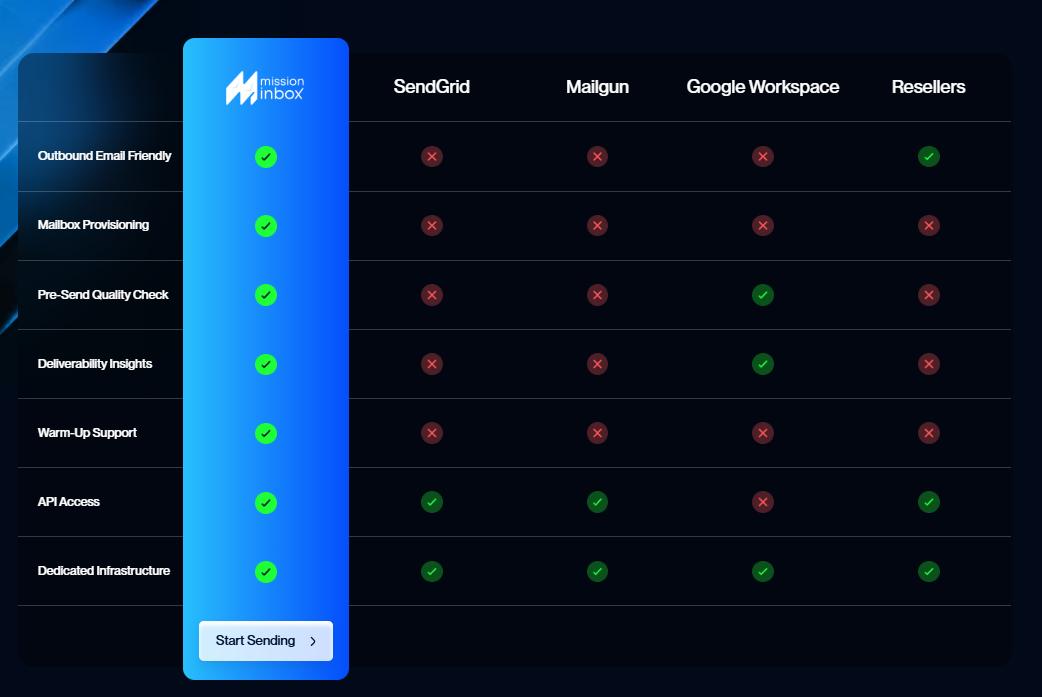
How the Major Platforms Compare
Mission Inboxx is build for Outreach at scale for Agencies. Enterprise, Financial services, Ai Agents and more.
The Features That Define Best-in-Class Infrastructure in 2026
Isolated Cubes
Each email workload gets its own server environment with its own dedicated IPs. Sales outreach is completely separate from marketing campaigns. Marketing is separate from transactional. For agencies, each client is separate from every other client. If one workload has a reputation issue, the others are architecturally protected.
Subdomain Isolation
Send from subdomains that leverage your root domain's established reputation while keeping all risk contained. If a subdomain encounters issues, the root domain and all other subdomains remain unaffected. One financial services client sends 120,000 emails per day with this architecture. Zero root domain damage.
Mission Inbox is the only provider offering true subdomain isolation at the infrastructure level.
MI Shield: AI Pre-Send Protection
Every outbound email is scanned before it leaves the server. Content structure, link safety, wording patterns, DNS configuration. If anything could trigger filters or damage reputation, the send is blocked. This protects against the most common way domains get burned: one team member sends bad content and the whole domain pays for it.
Blacklist Monitoring Every 7 Minutes With Auto-Failover
Automatic detection across 90+ blacklist sources. If an IP gets flagged, it is removed from rotation instantly. Other IPs continue sending. Zero downtime. No manual intervention required.
Superior Microsoft/Outlook Delivery
Dedicated IPs with established reputation deliver consistently to Outlook, Hotmail, Live.com, and enterprise environments behind Proofpoint and Barracuda. Where shared infrastructure fails, isolated infrastructure performs.
Automated Domain Management via API
Programmatic domain creation and DNS configuration through Cloudflare, GoDaddy, and Spaceship. One team manages 3,000 domains through a single API integration. Scale from 10 to 1,000+ domains without touching DNS settings manually.
OBM Engine API for Platforms
For SaaS companies building email sending into their product: white-label email infrastructure API with sub-50ms latency, isolated sending per customer, and full developer documentation. Several platforms already use it to power native email without building an MTA from scratch.
Works With Your Existing Sequencer
Not a replacement for Instantly, Smartlead, or any sequencer. The infrastructure layer underneath. Built-in export functions for Instantly, Smartlead, Emailbison, Woodpecker, and Reply. Connect Mission Inbox as the SMTP provider and your sequencer sends through isolated infrastructure.
Frequently Asked Questions
What is cold email infrastructure?
Cold email infrastructure is the technical foundation that determines whether your outreach emails reach the inbox or get filtered. It includes the servers your emails send from, the IP addresses tied to your reputation, authentication protocols (SPF, DKIM, DMARC), and any protection or monitoring layers between your team hitting "send" and the email arriving at the recipient's mailbox.
What is the best cold email infrastructure in 2026?
The best infrastructure depends on your scale and requirements. For teams doing cold outreach at scale (1,000+ emails per day), agencies managing multiple clients, or financial services companies, isolated infrastructure with dedicated IPs, workload isolation, and AI pre-send protection provides the highest deliverability and most control. Mission Inbox is the only provider offering all three.
What is the difference between shared IPs and dedicated IPs?
On shared IPs, your emails share IP addresses with other senders. Their behavior affects your reputation. On dedicated IPs, the IPs belong exclusively to you. Your reputation depends only on your sending behavior. Dedicated IPs provide more control but require warm-up if starting from zero.
What is isolated infrastructure?
Isolated infrastructure goes beyond dedicated IPs. Each email workload (sales, marketing, transactional) runs in its own server environment with its own IPs. If one workload has a reputation issue, the others are completely unaffected. For agencies, each client gets their own isolated environment. Mission Inbox calls these Isolated Cubes.
Do I need dedicated IPs for cold email?
If you send more than 1,000 emails per day or your deliverability directly impacts revenue, dedicated IPs provide significantly more control and reliability than shared pools. Shared IPs introduce risk from other senders' behavior that you cannot predict or control.
What is MI Shield?
MI Shield is an AI-powered firewall that scans every outbound email before it leaves the server. It checks content, links, wording patterns, and DNS configuration. If anything could trigger filters or damage reputation, the send is blocked. No other cold email infrastructure provider offers pre-send AI protection.
What is subdomain isolation?
Subdomain isolation separates email workloads onto different subdomains with different IPs. If one subdomain has reputation issues, the root domain and all other subdomains remain unaffected. Mission Inbox is the only provider offering this at the infrastructure level.
How does cold email infrastructure affect Microsoft/Outlook delivery?
Microsoft's SmartScreen filter weights IP reputation heavily. Shared IPs are the most vulnerable because one bad sender on the pool can trigger filtering for everyone. Dedicated IPs on isolated infrastructure deliver most consistently to Outlook, especially through enterprise gateways like Proofpoint and Barracuda.
Can I use cold email infrastructure with Instantly or Smartlead?
Yes. Infrastructure providers like Mission Inbox provide the SMTP layer underneath your sequencer. You keep your sequencer for campaigns and workflows. The infrastructure handles delivery through dedicated IPs and isolated servers. Mission Inbox has built-in export functions for Instantly, Smartlead, Woodpecker, Emailbison, and Reply.
How much does good cold email infrastructure cost?
Shared infrastructure starts as low as $3-6 per account. Dedicated IPs from traditional providers cost $59-90/month per IP. Mission Inbox's isolated infrastructure starts at $199/month base with dedicated IPs, MI Shield, subdomain isolation, and blacklist monitoring included. For teams sending at scale, isolated infrastructure often costs less than managing dozens of Google Workspace accounts.
Ready to Own Your Email Infrastructure?
Stop sharing IPs with strangers. Stop wondering why deliverability keeps dropping. Start sending on infrastructure built specifically for cold email at scale.